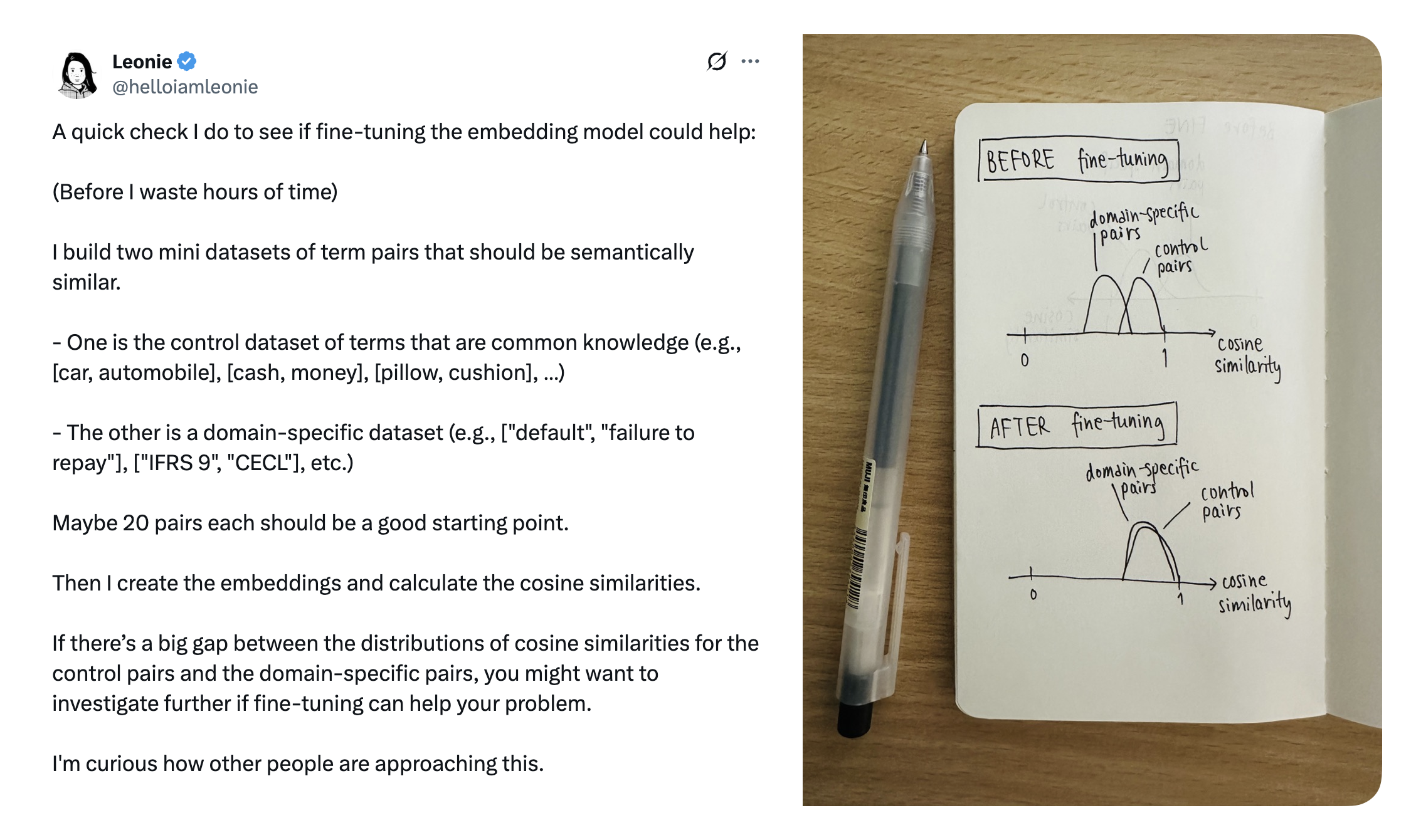
<?xml version="1.0" encoding="utf-8"?><feed xmlns="http://www.w3.org/2005/Atom" ><generator uri="https://jekyllrb.com/" version="4.4.1">Jekyll</generator><link href="/feed.xml" rel="self" type="application/atom+xml" /><link href="/" rel="alternate" type="text/html" /><updated>2026-05-12T12:28:07+00:00</updated><id>/feed.xml</id><title type="html">Akash Manohar John</title><subtitle>Projects, experiments, technical notes, and other work.</subtitle><entry><title type="html">Cosine Similarity</title><link href="/2025/06/01/cosine-similarity.html" rel="alternate" type="text/html" title="Cosine Similarity" /><published>2025-06-01T00:00:00+00:00</published><updated>2025-06-01T00:00:00+00:00</updated><id>/2025/06/01/cosine-similarity</id><content type="html" xml:base="/2025/06/01/cosine-similarity.html"><![CDATA[<p>I found <a href="https://x.com/helloiamleonie/status/1924758338966802709">this tweet by @helloiamleonie</a> at 5am while doom scrolling Twitter in bed. I looked up “cosine similarity” out of curiosity and that is what started it all for me, and hopefully for anyone reading this too.</p>

<p><img width="800" src="/assets/images/posts/cosine-similarity/similarity-tweet.png" /></p>

<p><small>Source - <a href="https://x.com/helloiamleonie/status/1924758338966802709">https://x.com/helloiamleonie/status/1924758338966802709</a></small></p>

<h2 id="prerequisites">Prerequisites</h2>

<p>Lets get the prereqs out of the way first. Ensure numpy and openai libraries are installed and import them.</p>

<div class="language-python highlighter-rouge"><div class="highlight"><pre class="highlight"><code><span class="c1"># Install packages
# !pip install openai python-dotenv numpy matplotlib
</span></code></pre></div></div>

<div class="language-python highlighter-rouge"><div class="highlight"><pre class="highlight"><code><span class="c1"># Load environment vars from .env file. 
# We have OPENAI_API_KEY in .env
</span><span class="kn">from</span> <span class="n">dotenv</span> <span class="kn">import</span> <span class="n">load_dotenv</span>
<span class="nf">load_dotenv</span><span class="p">()</span>

<span class="kn">from</span> <span class="n">openai</span> <span class="kn">import</span> <span class="n">OpenAI</span>
<span class="kn">import</span> <span class="n">numpy</span> <span class="k">as</span> <span class="n">np</span>

<span class="c1"># import this to plot some stuff
</span><span class="kn">import</span> <span class="n">matplotlib.pyplot</span> <span class="k">as</span> <span class="n">plt</span>

<span class="c1"># Create an OpenAI client, because we will be using this a few times
</span><span class="n">openai_client</span> <span class="o">=</span> <span class="nc">OpenAI</span><span class="p">()</span>
</code></pre></div></div>

<h2 id="comparison-beyond-equality-and-regex">Comparison, beyond equality and regex</h2>

<p>Given these phrases,</p>

<ul>
  <li>A: “Pizza was delicious”</li>
  <li>B: “I loved the pizza”</li>
  <li>C: “The staff were extremely helpful”</li>
</ul>

<p>In your code, if you were to check if these user reviews of a hotel are talking about the same thing, any possibility of using regex and equality is out of the window given the numerous things that customers can talk about. Cosine similarity helps your app understand that A &amp; B are talking about similar things, and that C talks about something else entirely.</p>

<p>To start, we use a text embedding model to give us numbers that represent these sentences.</p>

<blockquote>
  <p>“Embedding” is a representation of data as an vector. For any given input, an embedding model returns a vector that represents a that piece of input. For a while, we’ll be using vector and embedding interchangeably.</p>
</blockquote>

<p>Make a call to OpenAI, with the sentences as input. To keep things simple, we will ask for vectors of just two dimensions.</p>

<div class="language-python highlighter-rouge"><div class="highlight"><pre class="highlight"><code><span class="n">sentences</span> <span class="o">=</span> <span class="p">[</span>
    <span class="sh">"</span><span class="s">Pizza was delicious</span><span class="sh">"</span><span class="p">,</span>
    <span class="sh">"</span><span class="s">I loved the pizza</span><span class="sh">"</span><span class="p">,</span>
    <span class="sh">"</span><span class="s">The staff were extremely helpful</span><span class="sh">"</span>
<span class="p">]</span>

<span class="c1"># Fetch the embeddings
</span><span class="n">response</span> <span class="o">=</span> <span class="n">openai_client</span><span class="p">.</span><span class="n">embeddings</span><span class="p">.</span><span class="nf">create</span><span class="p">(</span>
    <span class="n">model</span><span class="o">=</span><span class="sh">"</span><span class="s">text-embedding-3-small</span><span class="sh">"</span><span class="p">,</span>
    <span class="nb">input</span><span class="o">=</span><span class="n">sentences</span><span class="p">,</span>
    <span class="n">dimensions</span><span class="o">=</span><span class="mi">2</span>
<span class="p">)</span>

<span class="c1"># This loops through the response and collects the embedding vector for each sentence
</span><span class="n">sentence_vectors</span> <span class="o">=</span> <span class="p">[</span><span class="n">np</span><span class="p">.</span><span class="nf">array</span><span class="p">(</span><span class="n">result</span><span class="p">.</span><span class="n">embedding</span><span class="p">)</span> <span class="k">for</span> <span class="n">result</span> <span class="ow">in</span> <span class="n">response</span><span class="p">.</span><span class="n">data</span><span class="p">]</span>

<span class="k">for</span> <span class="n">sentence</span><span class="p">,</span> <span class="n">vector</span> <span class="ow">in</span> <span class="nf">zip</span><span class="p">(</span><span class="n">sentences</span><span class="p">,</span> <span class="n">sentence_vectors</span><span class="p">):</span>
    <span class="nf">print</span><span class="p">(</span><span class="sa">f</span><span class="sh">"</span><span class="s">Sentence: </span><span class="si">{</span><span class="n">sentence</span><span class="si">}</span><span class="sh">"</span><span class="p">)</span>
    <span class="nf">print</span><span class="p">(</span><span class="sa">f</span><span class="sh">"</span><span class="se">\t</span><span class="si">{</span><span class="n">vector</span><span class="p">[</span><span class="mi">0</span><span class="p">]</span><span class="si">}</span><span class="s">, </span><span class="si">{</span><span class="n">vector</span><span class="p">[</span><span class="mi">1</span><span class="p">]</span><span class="si">}</span><span class="se">\n</span><span class="sh">"</span><span class="p">)</span>
</code></pre></div></div>

<p>This gives us these two-dimensional vectors:</p>

<table>
  <thead>
    <tr>
      <th>Sentence</th>
      <th>Vector</th>
    </tr>
  </thead>
  <tbody>
    <tr>
      <td>Pizza was delicious</td>
      <td><code class="language-plaintext highlighter-rouge">[-0.48245808482170105, -0.8759190440177917]</code></td>
    </tr>
    <tr>
      <td>I loved the pizza</td>
      <td><code class="language-plaintext highlighter-rouge">[0.1533546894788742, -0.9881712198257446]</code></td>
    </tr>
    <tr>
      <td>The staff were extremely helpful</td>
      <td><code class="language-plaintext highlighter-rouge">[-0.19024261832237244, 0.9817371368408203]</code></td>
    </tr>
  </tbody>
</table>

<p>We added another sentence “Pizza is bad” to find the vectors for. We will use this soon.</p>

<h3 id="plot-the-vectors-to-compare-them">Plot the vectors to compare them</h3>
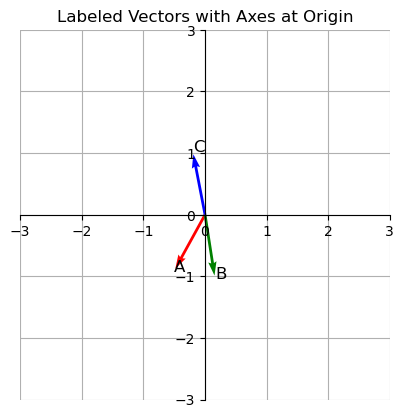
<p>It’s hard to compare these vectors just by looking at them. So lets plot them on a graph.</p>

<div class="language-python highlighter-rouge"><div class="highlight"><pre class="highlight"><code><span class="kn">import</span> <span class="n">matplotlib.pyplot</span> <span class="k">as</span> <span class="n">plt</span>

<span class="c1"># plot the vectors
</span><span class="n">plot_vectors</span> <span class="o">=</span> <span class="n">np</span><span class="p">.</span><span class="nf">array</span><span class="p">(</span><span class="n">sentence_vectors</span><span class="p">)</span>
<span class="n">origin</span> <span class="o">=</span> <span class="n">np</span><span class="p">.</span><span class="nf">zeros</span><span class="p">((</span><span class="mi">3</span><span class="p">,</span> <span class="mi">2</span><span class="p">))</span>

<span class="c1"># Create plot
</span><span class="n">fig</span><span class="p">,</span> <span class="n">ax</span> <span class="o">=</span> <span class="n">plt</span><span class="p">.</span><span class="nf">subplots</span><span class="p">()</span>

<span class="c1"># Plot vectors
</span><span class="n">ax</span><span class="p">.</span><span class="nf">quiver</span><span class="p">(</span><span class="n">origin</span><span class="p">[:,</span> <span class="mi">0</span><span class="p">],</span> <span class="n">origin</span><span class="p">[:,</span> <span class="mi">1</span><span class="p">],</span> <span class="n">plot_vectors</span><span class="p">[:,</span> <span class="mi">0</span><span class="p">],</span> <span class="n">plot_vectors</span><span class="p">[:,</span> <span class="mi">1</span><span class="p">],</span>
          <span class="n">angles</span><span class="o">=</span><span class="sh">'</span><span class="s">xy</span><span class="sh">'</span><span class="p">,</span> <span class="n">scale_units</span><span class="o">=</span><span class="sh">'</span><span class="s">xy</span><span class="sh">'</span><span class="p">,</span> <span class="n">scale</span><span class="o">=</span><span class="mi">1</span><span class="p">,</span> <span class="n">color</span><span class="o">=</span><span class="p">[</span><span class="sh">'</span><span class="s">r</span><span class="sh">'</span><span class="p">,</span> <span class="sh">'</span><span class="s">g</span><span class="sh">'</span><span class="p">,</span> <span class="sh">'</span><span class="s">b</span><span class="sh">'</span><span class="p">])</span>

<span class="c1"># Label each vector near its tip
</span><span class="n">labels</span> <span class="o">=</span> <span class="p">[</span><span class="sh">'</span><span class="s">A</span><span class="sh">'</span><span class="p">,</span> <span class="sh">'</span><span class="s">B</span><span class="sh">'</span><span class="p">,</span> <span class="sh">'</span><span class="s">C</span><span class="sh">'</span><span class="p">]</span>
<span class="k">for</span> <span class="n">vec</span><span class="p">,</span> <span class="n">label</span> <span class="ow">in</span> <span class="nf">zip</span><span class="p">(</span><span class="n">plot_vectors</span><span class="p">,</span> <span class="n">labels</span><span class="p">):</span>
    <span class="n">ax</span><span class="p">.</span><span class="nf">text</span><span class="p">(</span><span class="n">vec</span><span class="p">[</span><span class="mi">0</span><span class="p">]</span><span class="o">*</span><span class="mf">1.05</span><span class="p">,</span> <span class="n">vec</span><span class="p">[</span><span class="mi">1</span><span class="p">]</span><span class="o">*</span><span class="mf">1.05</span><span class="p">,</span> <span class="n">label</span><span class="p">,</span> <span class="n">fontsize</span><span class="o">=</span><span class="mi">12</span><span class="p">)</span>

<span class="c1"># Axes setup
</span><span class="n">ax</span><span class="p">.</span><span class="nf">set_aspect</span><span class="p">(</span><span class="sh">'</span><span class="s">equal</span><span class="sh">'</span><span class="p">)</span>
<span class="n">ax</span><span class="p">.</span><span class="nf">set_xlim</span><span class="p">(</span><span class="o">-</span><span class="mi">3</span><span class="p">,</span> <span class="mi">3</span><span class="p">)</span>
<span class="n">ax</span><span class="p">.</span><span class="nf">set_ylim</span><span class="p">(</span><span class="o">-</span><span class="mi">3</span><span class="p">,</span> <span class="mi">3</span><span class="p">)</span>

<span class="c1"># Move axes to origin
</span><span class="n">ax</span><span class="p">.</span><span class="n">spines</span><span class="p">[</span><span class="sh">'</span><span class="s">left</span><span class="sh">'</span><span class="p">].</span><span class="nf">set_position</span><span class="p">(</span><span class="sh">'</span><span class="s">zero</span><span class="sh">'</span><span class="p">)</span>
<span class="n">ax</span><span class="p">.</span><span class="n">spines</span><span class="p">[</span><span class="sh">'</span><span class="s">bottom</span><span class="sh">'</span><span class="p">].</span><span class="nf">set_position</span><span class="p">(</span><span class="sh">'</span><span class="s">zero</span><span class="sh">'</span><span class="p">)</span>
<span class="n">ax</span><span class="p">.</span><span class="n">spines</span><span class="p">[</span><span class="sh">'</span><span class="s">top</span><span class="sh">'</span><span class="p">].</span><span class="nf">set_color</span><span class="p">(</span><span class="sh">'</span><span class="s">none</span><span class="sh">'</span><span class="p">)</span>
<span class="n">ax</span><span class="p">.</span><span class="n">spines</span><span class="p">[</span><span class="sh">'</span><span class="s">right</span><span class="sh">'</span><span class="p">].</span><span class="nf">set_color</span><span class="p">(</span><span class="sh">'</span><span class="s">none</span><span class="sh">'</span><span class="p">)</span>

<span class="c1"># Grid and title
</span><span class="n">ax</span><span class="p">.</span><span class="nf">grid</span><span class="p">(</span><span class="bp">True</span><span class="p">)</span>
<span class="n">plt</span><span class="p">.</span><span class="nf">title</span><span class="p">(</span><span class="sh">"</span><span class="s">Labeled Vectors with Axes at Origin</span><span class="sh">"</span><span class="p">)</span>
<span class="n">plt</span><span class="p">.</span><span class="nf">show</span><span class="p">()</span>
</code></pre></div></div>

<p><img src="/assets/images/posts/cosine-similarity/cosine-similarity_9_0.png" alt="png" /></p>

<p>Notice A and B are close by. But C is pointing in an entirely different direction. Cosine similarity helps check how “similar” these vectors are. We will use the following function to calculate cosine similarity.</p>

<p><em>Copy-pasta this for now. We will explore this function later.</em></p>

<div class="language-python highlighter-rouge"><div class="highlight"><pre class="highlight"><code><span class="k">def</span> <span class="nf">cosine_similarity</span><span class="p">(</span><span class="n">vec1</span><span class="p">,</span> <span class="n">vec2</span><span class="p">):</span>
    <span class="n">vec1</span> <span class="o">=</span> <span class="n">np</span><span class="p">.</span><span class="nf">array</span><span class="p">(</span><span class="n">vec1</span><span class="p">)</span>
    <span class="n">vec2</span> <span class="o">=</span> <span class="n">np</span><span class="p">.</span><span class="nf">array</span><span class="p">(</span><span class="n">vec2</span><span class="p">)</span>
    <span class="n">dot_product</span> <span class="o">=</span> <span class="n">np</span><span class="p">.</span><span class="nf">dot</span><span class="p">(</span><span class="n">vec1</span><span class="p">,</span> <span class="n">vec2</span><span class="p">)</span>
    <span class="n">norm_product</span> <span class="o">=</span> <span class="n">np</span><span class="p">.</span><span class="n">linalg</span><span class="p">.</span><span class="nf">norm</span><span class="p">(</span><span class="n">vec1</span><span class="p">)</span> <span class="o">*</span> <span class="n">np</span><span class="p">.</span><span class="n">linalg</span><span class="p">.</span><span class="nf">norm</span><span class="p">(</span><span class="n">vec2</span><span class="p">)</span>
    <span class="k">return</span> <span class="n">dot_product</span> <span class="o">/</span> <span class="n">norm_product</span>
</code></pre></div></div>

<p>Let us compare the following sentences using cosine similarity:</p>
<ul>
  <li>A: <em>“Pizza was delicious”</em></li>
  <li>B: <em>“I loved the pizza”</em></li>
</ul>

<div class="language-python highlighter-rouge"><div class="highlight"><pre class="highlight"><code><span class="nf">cosine_similarity</span><span class="p">(</span><span class="n">sentence_vectors</span><span class="p">[</span><span class="mi">0</span><span class="p">],</span> <span class="n">sentence_vectors</span><span class="p">[</span><span class="mi">1</span><span class="p">])</span>
</code></pre></div></div>

<p>This returns <code class="language-plaintext highlighter-rouge">0.7915707820894159</code>.</p>

<p>Now compare A &amp; C:</p>
<ul>
  <li>A: <em>“Pizza was delicious”</em></li>
  <li>C: <em>“The staff were extremely helpful”</em></li>
</ul>

<div class="language-python highlighter-rouge"><div class="highlight"><pre class="highlight"><code><span class="nf">cosine_similarity</span><span class="p">(</span><span class="n">sentence_vectors</span><span class="p">[</span><span class="mi">0</span><span class="p">],</span> <span class="n">sentence_vectors</span><span class="p">[</span><span class="mi">2</span><span class="p">])</span>
</code></pre></div></div>

<p>This returns <code class="language-plaintext highlighter-rouge">-0.7681381516634945</code>.</p>

<p>Defining a range to decide if these numbers mean the inputs are similar or disimilar, is entirely upto your application. You may define that 0.7 is a good enough minimum score to indicate similarity.</p>

<h2 id="reasons-behind-choosing-cosine-similarity">Reasons behind choosing cosine similarity</h2>

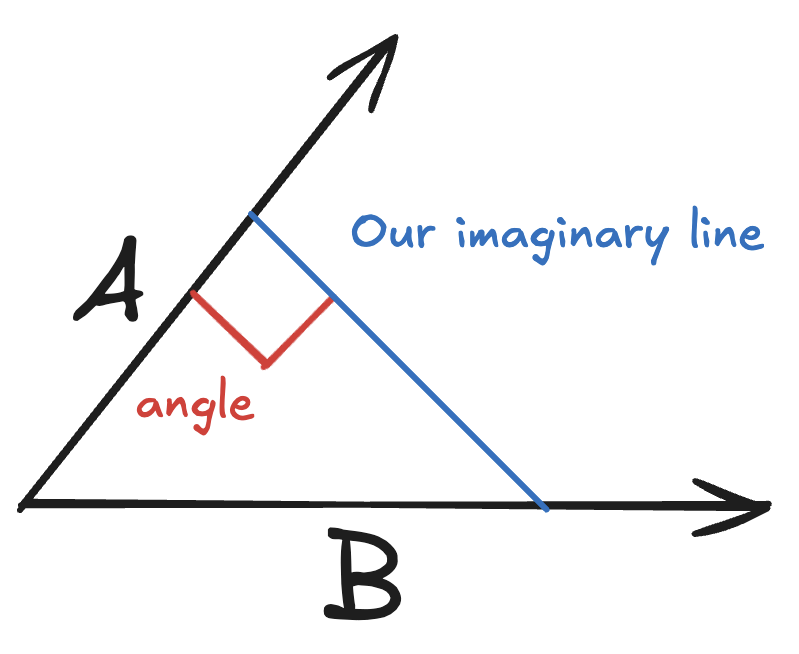
<p>Given two lines, A &amp; B, that both start at the origin <code class="language-plaintext highlighter-rouge">(0, 0)</code>, visually, it is easy to compare if they are pointing in the same direction (or atleast how close they are). If you had to translate this to code, geometry has the answer.</p>

<p><img width="300" src="/assets/images/posts/cosine-similarity/perpendicular.png" /></p>

<p>We are going to need another imaginary line. Pick any point on the line A, and draw a perpendicular line to the line B.</p>

<p>Now with our imaginary line in place, we get to use Pythagoras theorem since the angle between A and the imaginary line is 90 degrees. We can then use any equation that gives us a value to compare how close these lines are.</p>

<p>Inputs we have:</p>
<ul>
  <li>A forms the adjacent side</li>
  <li>B is the hypotenuse</li>
</ul>

<p>From trigonometry, if you remember <em><a href="https://www.youtube.com/watch?v=Jsiy4TxgIME">“SOH CAH TOA”</a></em>, the <code class="language-plaintext highlighter-rouge">CAH</code> is</p>

<div class="language-plaintext highlighter-rouge"><div class="highlight"><pre class="highlight"><code>cos = adj / hyp
</code></pre></div></div>

<p>Now we can use cos($\theta$) to decide if A and B are pointing in the same direction.</p>

<p>But why cosine? Why not sine, or tangent?</p>

<h3 id="bounded-values">Bounded values</h3>

<p>Are 50 and 55 close? Yes? What if the range was always betwen 50 and 55? Now the 50 and 55 seem like extremes.</p>

<p>Without bounds, a score to compare similarity is meaningless. Cosine always returns a value between <code class="language-plaintext highlighter-rouge">-1</code> and <code class="language-plaintext highlighter-rouge">+1</code>. So now you can set your own definition of similarity. Lets say that you configure your app that any value between <code class="language-plaintext highlighter-rouge">0.7</code> and <code class="language-plaintext highlighter-rouge">1.0</code> means that the inputs are similar.</p>

<p>This disqualifies tan($\theta$), because has a much larger range <code class="language-plaintext highlighter-rouge">-infinity</code> to <code class="language-plaintext highlighter-rouge">+infinity</code>.</p>

<h3 id="ability-to-represent-the-entire-range-of-values">Ability to represent the entire range of values</h3>

<p>When comparing vectors, our similarity test may result in any of the following:</p>

<ul>
  <li>The inputs are similar</li>
  <li>The inputs are opposites</li>
  <li>The inputs are unrelated</li>
</ul>

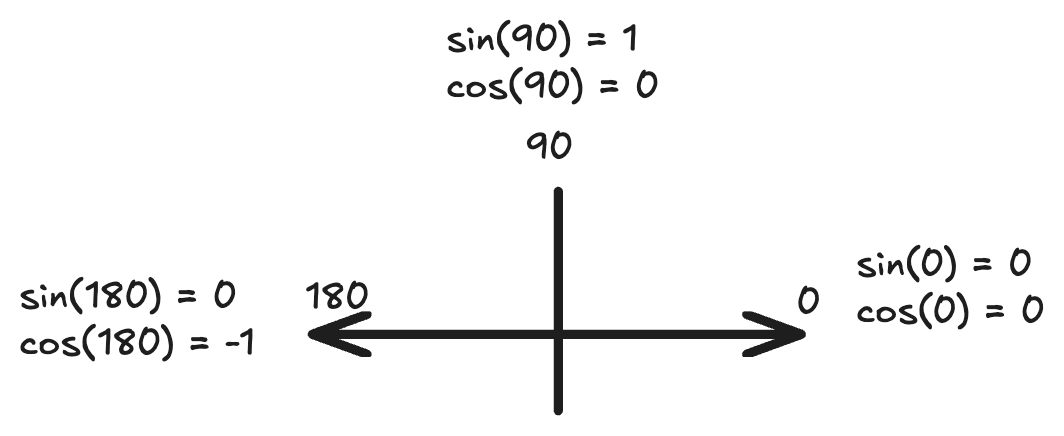
<p>So we need a function that can represent 3 distinct states. This immediately disqualifies sine. Because sin(0°) and sin(180°) have the same value even though the lines would point in the opposite directions.</p>

<p><img width="500" src="/assets/images/posts/cosine-similarity/cos-sin.png" /></p>

<p>With cosine, we get:</p>
<ul>
  <li>1 if the input vectors are related - pointing in the same direction.</li>
  <li>0 if the input vectors are unrelated (perpendicular).</li>
  <li>-1 if the input vectors are pointing in opposite directions (Example: <em>“pizza is good”</em> vs <em>“pizza is bad”</em>)</li>
</ul>

<blockquote>
  <p><em>“Pizza is good”</em> and <em>“Pizza is bad”</em> being opposites depends on the model’s understanding. But for now, we will assume that it understands pizzas and taste.</p>
</blockquote>

<p>So cosine wins, atleast for this lesson.</p>

<p>Our cosine similarity function has been a black box so far. Next, we explore how to calculate cosine similarity, and also explore other functions to calculate similarity.</p>]]></content><author><name></name></author><summary type="html"><![CDATA[I found this tweet by @helloiamleonie at 5am while doom scrolling Twitter in bed. I looked up “cosine similarity” out of curiosity and that is what started it all for me, and hopefully for anyone reading this too. Source - https://x.com/helloiamleonie/status/1924758338966802709 Prerequisites Lets get the prereqs out of the way first. Ensure numpy and openai libraries are installed and import them. # Install packages # !pip install openai python-dotenv numpy matplotlib # Load environment vars from .env file. # We have OPENAI_API_KEY in .env from dotenv import load_dotenv load_dotenv() from openai import OpenAI import numpy as np # import this to plot some stuff import matplotlib.pyplot as plt # Create an OpenAI client, because we will be using this a few times openai_client = OpenAI() Comparison, beyond equality and regex Given these phrases, A: “Pizza was delicious” B: “I loved the pizza” C: “The staff were extremely helpful” In your code, if you were to check if these user reviews of a hotel are talking about the same thing, any possibility of using regex and equality is out of the window given the numerous things that customers can talk about. Cosine similarity helps your app understand that A &amp; B are talking about similar things, and that C talks about something else entirely. To start, we use a text embedding model to give us numbers that represent these sentences. “Embedding” is a representation of data as an vector. For any given input, an embedding model returns a vector that represents a that piece of input. For a while, we’ll be using vector and embedding interchangeably. Make a call to OpenAI, with the sentences as input. To keep things simple, we will ask for vectors of just two dimensions. sentences = [ "Pizza was delicious", "I loved the pizza", "The staff were extremely helpful" ] # Fetch the embeddings response = openai_client.embeddings.create( model="text-embedding-3-small", input=sentences, dimensions=2 ) # This loops through the response and collects the embedding vector for each sentence sentence_vectors = [np.array(result.embedding) for result in response.data] for sentence, vector in zip(sentences, sentence_vectors): print(f"Sentence: {sentence}") print(f"\t{vector[0]}, {vector[1]}\n") This gives us these two-dimensional vectors: Sentence Vector Pizza was delicious [-0.48245808482170105, -0.8759190440177917] I loved the pizza [0.1533546894788742, -0.9881712198257446] The staff were extremely helpful [-0.19024261832237244, 0.9817371368408203] We added another sentence “Pizza is bad” to find the vectors for. We will use this soon. Plot the vectors to compare them It’s hard to compare these vectors just by looking at them. So lets plot them on a graph. import matplotlib.pyplot as plt # plot the vectors plot_vectors = np.array(sentence_vectors) origin = np.zeros((3, 2)) # Create plot fig, ax = plt.subplots() # Plot vectors ax.quiver(origin[:, 0], origin[:, 1], plot_vectors[:, 0], plot_vectors[:, 1], angles='xy', scale_units='xy', scale=1, color=['r', 'g', 'b']) # Label each vector near its tip labels = ['A', 'B', 'C'] for vec, label in zip(plot_vectors, labels): ax.text(vec[0]*1.05, vec[1]*1.05, label, fontsize=12) # Axes setup ax.set_aspect('equal') ax.set_xlim(-3, 3) ax.set_ylim(-3, 3) # Move axes to origin ax.spines['left'].set_position('zero') ax.spines['bottom'].set_position('zero') ax.spines['top'].set_color('none') ax.spines['right'].set_color('none') # Grid and title ax.grid(True) plt.title("Labeled Vectors with Axes at Origin") plt.show() Notice A and B are close by. But C is pointing in an entirely different direction. Cosine similarity helps check how “similar” these vectors are. We will use the following function to calculate cosine similarity. Copy-pasta this for now. We will explore this function later. def cosine_similarity(vec1, vec2): vec1 = np.array(vec1) vec2 = np.array(vec2) dot_product = np.dot(vec1, vec2) norm_product = np.linalg.norm(vec1) * np.linalg.norm(vec2) return dot_product / norm_product Let us compare the following sentences using cosine similarity: A: “Pizza was delicious” B: “I loved the pizza” cosine_similarity(sentence_vectors[0], sentence_vectors[1]) This returns 0.7915707820894159. Now compare A &amp; C: A: “Pizza was delicious” C: “The staff were extremely helpful” cosine_similarity(sentence_vectors[0], sentence_vectors[2]) This returns -0.7681381516634945. Defining a range to decide if these numbers mean the inputs are similar or disimilar, is entirely upto your application. You may define that 0.7 is a good enough minimum score to indicate similarity. Reasons behind choosing cosine similarity Given two lines, A &amp; B, that both start at the origin (0, 0), visually, it is easy to compare if they are pointing in the same direction (or atleast how close they are). If you had to translate this to code, geometry has the answer. We are going to need another imaginary line. Pick any point on the line A, and draw a perpendicular line to the line B. Now with our imaginary line in place, we get to use Pythagoras theorem since the angle between A and the imaginary line is 90 degrees. We can then use any equation that gives us a value to compare how close these lines are. Inputs we have: A forms the adjacent side B is the hypotenuse From trigonometry, if you remember “SOH CAH TOA”, the CAH is cos = adj / hyp Now we can use cos($\theta$) to decide if A and B are pointing in the same direction. But why cosine? Why not sine, or tangent? Bounded values Are 50 and 55 close? Yes? What if the range was always betwen 50 and 55? Now the 50 and 55 seem like extremes. Without bounds, a score to compare similarity is meaningless. Cosine always returns a value between -1 and +1. So now you can set your own definition of similarity. Lets say that you configure your app that any value between 0.7 and 1.0 means that the inputs are similar. This disqualifies tan($\theta$), because has a much larger range -infinity to +infinity. Ability to represent the entire range of values When comparing vectors, our similarity test may result in any of the following: The inputs are similar The inputs are opposites The inputs are unrelated So we need a function that can represent 3 distinct states. This immediately disqualifies sine. Because sin(0°) and sin(180°) have the same value even though the lines would point in the opposite directions. With cosine, we get: 1 if the input vectors are related - pointing in the same direction. 0 if the input vectors are unrelated (perpendicular). -1 if the input vectors are pointing in opposite directions (Example: “pizza is good” vs “pizza is bad”) “Pizza is good” and “Pizza is bad” being opposites depends on the model’s understanding. But for now, we will assume that it understands pizzas and taste. So cosine wins, atleast for this lesson. Our cosine similarity function has been a black box so far. Next, we explore how to calculate cosine similarity, and also explore other functions to calculate similarity.]]></summary></entry><entry><title type="html">Trip to Vietnam</title><link href="/vietnam" rel="alternate" type="text/html" title="Trip to Vietnam" /><published>2023-09-19T14:09:00+00:00</published><updated>2023-09-19T14:09:00+00:00</updated><id>/trip-to-vietnam</id><content type="html" xml:base="/vietnam"><![CDATA[<blockquote>
  <p><em>This page exists because I often get asked about info for organizing trips to Vietnam. Everything I know is on this page.</em></p>
</blockquote>

<ul>
  <li>Vietnam has a lot of tourist attractions. You cannot cover everything in a week or even two weeks.</li>
  <li>For booking tours, lookup the links in the last section after reading rest of this page.</li>
</ul>

<p><strong>What to expect on the trip?</strong></p>
<ul>
  <li>Scenic views.</li>
  <li>Lots of limestone caves.</li>
  <li>Beaches.</li>
  <li>Beautiful cafes (with wifi).</li>
  <li>Good food.</li>
  <li>Bespoke suits.</li>
</ul>

<p><strong>If you have one week and prefer to travel slow:</strong></p>
<ul>
  <li>Land in Hanoi.</li>
  <li>Go to Ninh Binh for a slow 2-day or 3-day trip.</li>
  <li>Book a cruise for Ha Long Bay.</li>
  <li>Exit via Hanoi.</li>
</ul>

<p><strong>If you have one week and prefer to see as much as you can:</strong></p>
<ul>
  <li>Land in Hanoi.</li>
  <li>Go on a Ninh Binh day trip with a tour group.</li>
  <li>Go on a Sapa trip with a tour group.</li>
  <li>Book a cruise for Ha Long Bay.</li>
</ul>

<p><strong>If you have more than one week:</strong></p>
<ul>
  <li>Go on a trip to the places mentioned above.</li>
  <li>Then checkout more places in Central Vietnam.</li>
</ul>

<blockquote>
  <p><em>I haven’t visited all the places in Vietnam. This page also includes recommendations I’ve received from other people. This page is only a starting point for your research. Look up places mentioned below on the internet.</em></p>
</blockquote>

<h2 id="north-vietnam">North Vietnam</h2>

<p><strong>Hanoi</strong></p>
<ul>
  <li>Land in Hanoi. Treat this place like a juncture to travel to other places.</li>
  <li>Old Quarter is the tourist area close to a lot of places (+ tourist traps).
    <ul>
      <li>Beer street is located there too.</li>
      <li>Book some walking tours.</li>
    </ul>
  </li>
  <li>Where to stay?
    <ul>
      <li><a href="https://www.hostelworld.com/">Hostels</a> are good if you are ok with dorm beds.</li>
      <li>If you prefer private rooms, checkout Airbnbs and hotels.</li>
      <li>If you like to stay in hotel chains, there are Mercure La Gare, Grand Mercure, Pullman, InterContinencal, Movenpick, Sofitel and Novotel.</li>
    </ul>
  </li>
  <li>If you have time to spare, try to visit the Vinhomes Ocean City. This is a private apartment complex of about 2600 acres (township?). This place is open to visitors. Look up pictures online 😀</li>
</ul>

<p><strong>Ninh Binh:</strong></p>
<ul>
  <li>If not going with a tour group, then taking a 2hr train from Hanoi is an option.</li>
  <li>Where to stay?
    <ul>
      <li>If your trip is more than a day trip, then you can stay at any of the homestays/hotels.</li>
      <li>Look these up on <a href="https://booking.com">booking.com</a>. These are not exactly “homestays”. They have well-furnished rooms with air-conditioning.</li>
    </ul>
  </li>
  <li>For getting around in Ninh Binh,
    <ul>
      <li>Your hotel can rent you a motor bike.</li>
      <li>It’s a small town. Most places are nearby. The drive to far away places are scenic and quiet.</li>
    </ul>
  </li>
  <li>Trang An boat tour
    <ul>
      <li>👍 Highly recommend this.</li>
      <li>About 2-3hrs of boat tour with scenic views. One of the route options include going through a 1km cave by boat.</li>
    </ul>
  </li>
  <li>Mua Cave (a bit of a misnomer, because this is a mountain to climb).</li>
  <li>Thung Nham Bird Park - Get a map. This bird park has a lot of limestone caves.</li>
  <li>Look up the pagodas/templates you want to visit.</li>
  <li><em>Avoid the Tam Coc boat tour. Not worth going for this one. The Trang An boat tour is much better organized.</em></li>
</ul>

<p><strong>Ha Long Bay:</strong></p>
<ul>
  <li>Book a cruise for 2 days and 1 night.</li>
  <li>Which cruise to book?
    <ul>
      <li>A friend of mine booked Erina cruise (2023). He loved it. The pictures looked great.</li>
      <li>I’ve also heard goo experiences from those that booked with Sapphire Cruise.</li>
      <li>I went by Bhaya cruise (2018). I loved my experience too.</li>
      <li>There are a lot of cruises. Feel free to find others too. Most cruise operators seem to have websites with online bookings.</li>
    </ul>
  </li>
  <li>The cruise operators will pick you up and drop you back in Hanoi’s Old Quarter area.</li>
  <li>If you have dietary restrictions, please ensure to inform the cruise operator well ahead of your trip so that they can prepare to serve you appropriate food.</li>
</ul>

<p><strong>Sapa:</strong></p>
<ul>
  <li>Trekking, rice fields, etc.</li>
  <li>Go with a tour group. A day trip from Hanoi is possible. Three days would be better.</li>
</ul>

<h2 id="central-vietnam">Central Vietnam</h2>

<p>Da Nang has an international airport.</p>

<p><strong>Da Nang:</strong></p>
<ul>
  <li>SunWorld Ba Na Hills
    <ul>
      <li>Amusement park.</li>
      <li>World’s longest nonstop cable car.</li>
    </ul>
  </li>
  <li>Marble mountains</li>
  <li>Lady Buddha temple</li>
  <li>Museums</li>
  <li>Beaches</li>
</ul>

<p><strong>Other places:</strong></p>
<ul>
  <li>Hoi An
    <ul>
      <li>Town with a UNESCO heritage site.</li>
      <li>1hr from Da Nang.</li>
    </ul>
  </li>
  <li>Hang Son Doong Cave
    <ul>
      <li>World’s largest cave.</li>
      <li>5hrs from Da Nang.</li>
    </ul>
  </li>
  <li>Hue
    <ul>
      <li>Ancient Citadel.</li>
      <li>45min from Da Nang.</li>
      <li>If you are from India, this places offers the similar value for tourists like Mysore does (I would skip).</li>
    </ul>
  </li>
</ul>

<h2 id="south-vietnam">South Vietnam</h2>

<p><strong>Ho Chi Minh City:</strong></p>
<ul>
  <li>Land in Tan Son Nhat International Airport.</li>
  <li>What to do? Good food, good cafes and good night-life. Safe city.</li>
  <li>Where to eat? District-1, District-2 (Thao Dien), District-3</li>
  <li>Cu Chi Tunnels - 70km from the city.</li>
</ul>

<p><strong>Other places:</strong></p>
<ul>
  <li>Mekong Delta</li>
  <li>Phu Quoc island - There are direct flights to this place from India.</li>
  <li>Da Lat</li>
  <li>Nha Trang</li>
</ul>

<h2 id="notes-on-food-in-vietnam">Notes on food in Vietnam</h2>

<ul>
  <li>Tropical fruits. Consider yourself lucky if you are travelling during the Durian season. I love the RE6 variety (too sweet). Checkout other varieties too.</li>
  <li>Iced Coffee and Iced Tea is more common here. You will have to request for hot if you want it so.</li>
  <li>Checkout Salt Coffee, Egg Coffee and Garlic Coffee.</li>
  <li>Meat in food is common here. But there are both Vegetarians and <a href="https://en.wiktionary.org/wiki/eggetarian">Eggetarians</a> in Vietnam.</li>
  <li><em>Chay</em> means vegetarian food (this includes milk products). Use this keyword to look for places that serve vegetarian food. Check if the place serves egg in dishes (some chay places do use egg).</li>
  <li>Will I find vegan food? Sure. Look it up.</li>
  <li>Will I find Indian food? Find - Yes. Plenty. Good? I don’t know. I haven’t tried Indian food in Vietnam. But I’ve heard there are good restaurants. <em>Beware: Like everywhere else, not everything that has good reviews on Google is true. To be able to judge better, read the bad reviews too.</em></li>
  <li>What if I prefer Halal food? That is a hard limitation. You will find them if you look for it. But it is not common. This could translate to a starvation scenario if you do not plan well. Look up places for food and plan your trip appropriately.</li>
</ul>

<h2 id="contacts--other-links">Contacts &amp; other links</h2>
<ul>
  <li>Use <a href="https://12go.asia/en">12go.asia</a> to lookup bus and train bookings.</li>
  <li>Checkout <a href="https://www.airbnb.com/s/experiences">Airbnb Experiences</a> for booking tours.</li>
  <li>A friend went with <a href="https://amitysmiletravel.com/">AmitySmileTravel.com</a> for Sapa tour and he enjoyed his trip.</li>
  <li>Whichever airport you land, get a SIM card before exiting the airport. Viettel is a good network.</li>
  <li>Install Grab on your phone for booking cabs.</li>
  <li>If you are using international roaming, and if your phone calls aren’t working, then disable automatic network selection on your phone, and try manually selecting Viettel as your mobile network in your phone’s settings.</li>
</ul>

<p><strong>Currency:</strong></p>
<ul>
  <li>Ensure to get atleast 5 million VND (Vietnamese Dong) if you have a debit/credit card with zero forex charges.</li>
  <li>If do not have a zero/low-markup forex card, then bring your expenses as VND with you.</li>
  <li>How much will you need? Probably 0.5 million VND per-person-per-day if you prefer having local cuisine for food (doesn’t include hotel bookings and airline tickets).</li>
  <li>To check prices against INR, use the multiplier 3.5 (actually around 3.35 but approx is fine). So 100k VND is approx INR 350. 1 million VND is approx INR 3500.</li>
  <li>If you have a sudden craving for food on a Vietjet flight, pay in VND. The prices on their menu are listed in VND. Do not pay in INR or any other currency.</li>
</ul>

<p><strong>Visa to Vietnam:</strong></p>
<ul>
  <li>Apply for Vietnam e-Visa on the immigration portal - <a href="https://evisa.gov.vn/">https://evisa.gov.vn/</a> (the website might need ad blockers disabled to load).</li>
  <li>Takes about 5 days to get your evisa. Please carry a printed copy of your evisa when you travel.</li>
  <li>Indians can get visa on arrival to Phu Quoc island. But you need a valid Vietnam visa to enter mainland Vietnam from Phu Quoc or elsewhere.</li>
</ul>]]></content><author><name></name></author><summary type="html"><![CDATA[This page exists because I often get asked about info for organizing trips to Vietnam. Everything I know is on this page. Vietnam has a lot of tourist attractions. You cannot cover everything in a week or even two weeks. For booking tours, lookup the links in the last section after reading rest of this page. What to expect on the trip? Scenic views. Lots of limestone caves. Beaches. Beautiful cafes (with wifi). Good food. Bespoke suits. If you have one week and prefer to travel slow: Land in Hanoi. Go to Ninh Binh for a slow 2-day or 3-day trip. Book a cruise for Ha Long Bay. Exit via Hanoi. If you have one week and prefer to see as much as you can: Land in Hanoi. Go on a Ninh Binh day trip with a tour group. Go on a Sapa trip with a tour group. Book a cruise for Ha Long Bay. If you have more than one week: Go on a trip to the places mentioned above. Then checkout more places in Central Vietnam. I haven’t visited all the places in Vietnam. This page also includes recommendations I’ve received from other people. This page is only a starting point for your research. Look up places mentioned below on the internet. North Vietnam Hanoi Land in Hanoi. Treat this place like a juncture to travel to other places. Old Quarter is the tourist area close to a lot of places (+ tourist traps). Beer street is located there too. Book some walking tours. Where to stay? Hostels are good if you are ok with dorm beds. If you prefer private rooms, checkout Airbnbs and hotels. If you like to stay in hotel chains, there are Mercure La Gare, Grand Mercure, Pullman, InterContinencal, Movenpick, Sofitel and Novotel. If you have time to spare, try to visit the Vinhomes Ocean City. This is a private apartment complex of about 2600 acres (township?). This place is open to visitors. Look up pictures online 😀 Ninh Binh: If not going with a tour group, then taking a 2hr train from Hanoi is an option. Where to stay? If your trip is more than a day trip, then you can stay at any of the homestays/hotels. Look these up on booking.com. These are not exactly “homestays”. They have well-furnished rooms with air-conditioning. For getting around in Ninh Binh, Your hotel can rent you a motor bike. It’s a small town. Most places are nearby. The drive to far away places are scenic and quiet. Trang An boat tour 👍 Highly recommend this. About 2-3hrs of boat tour with scenic views. One of the route options include going through a 1km cave by boat. Mua Cave (a bit of a misnomer, because this is a mountain to climb). Thung Nham Bird Park - Get a map. This bird park has a lot of limestone caves. Look up the pagodas/templates you want to visit. Avoid the Tam Coc boat tour. Not worth going for this one. The Trang An boat tour is much better organized. Ha Long Bay: Book a cruise for 2 days and 1 night. Which cruise to book? A friend of mine booked Erina cruise (2023). He loved it. The pictures looked great. I’ve also heard goo experiences from those that booked with Sapphire Cruise. I went by Bhaya cruise (2018). I loved my experience too. There are a lot of cruises. Feel free to find others too. Most cruise operators seem to have websites with online bookings. The cruise operators will pick you up and drop you back in Hanoi’s Old Quarter area. If you have dietary restrictions, please ensure to inform the cruise operator well ahead of your trip so that they can prepare to serve you appropriate food. Sapa: Trekking, rice fields, etc. Go with a tour group. A day trip from Hanoi is possible. Three days would be better. Central Vietnam Da Nang has an international airport. Da Nang: SunWorld Ba Na Hills Amusement park. World’s longest nonstop cable car. Marble mountains Lady Buddha temple Museums Beaches Other places: Hoi An Town with a UNESCO heritage site. 1hr from Da Nang. Hang Son Doong Cave World’s largest cave. 5hrs from Da Nang. Hue Ancient Citadel. 45min from Da Nang. If you are from India, this places offers the similar value for tourists like Mysore does (I would skip). South Vietnam Ho Chi Minh City: Land in Tan Son Nhat International Airport. What to do? Good food, good cafes and good night-life. Safe city. Where to eat? District-1, District-2 (Thao Dien), District-3 Cu Chi Tunnels - 70km from the city. Other places: Mekong Delta Phu Quoc island - There are direct flights to this place from India. Da Lat Nha Trang Notes on food in Vietnam Tropical fruits. Consider yourself lucky if you are travelling during the Durian season. I love the RE6 variety (too sweet). Checkout other varieties too. Iced Coffee and Iced Tea is more common here. You will have to request for hot if you want it so. Checkout Salt Coffee, Egg Coffee and Garlic Coffee. Meat in food is common here. But there are both Vegetarians and Eggetarians in Vietnam. Chay means vegetarian food (this includes milk products). Use this keyword to look for places that serve vegetarian food. Check if the place serves egg in dishes (some chay places do use egg). Will I find vegan food? Sure. Look it up. Will I find Indian food? Find - Yes. Plenty. Good? I don’t know. I haven’t tried Indian food in Vietnam. But I’ve heard there are good restaurants. Beware: Like everywhere else, not everything that has good reviews on Google is true. To be able to judge better, read the bad reviews too. What if I prefer Halal food? That is a hard limitation. You will find them if you look for it. But it is not common. This could translate to a starvation scenario if you do not plan well. Look up places for food and plan your trip appropriately. Contacts &amp; other links Use 12go.asia to lookup bus and train bookings. Checkout Airbnb Experiences for booking tours. A friend went with AmitySmileTravel.com for Sapa tour and he enjoyed his trip. Whichever airport you land, get a SIM card before exiting the airport. Viettel is a good network. Install Grab on your phone for booking cabs. If you are using international roaming, and if your phone calls aren’t working, then disable automatic network selection on your phone, and try manually selecting Viettel as your mobile network in your phone’s settings. Currency: Ensure to get atleast 5 million VND (Vietnamese Dong) if you have a debit/credit card with zero forex charges. If do not have a zero/low-markup forex card, then bring your expenses as VND with you. How much will you need? Probably 0.5 million VND per-person-per-day if you prefer having local cuisine for food (doesn’t include hotel bookings and airline tickets). To check prices against INR, use the multiplier 3.5 (actually around 3.35 but approx is fine). So 100k VND is approx INR 350. 1 million VND is approx INR 3500. If you have a sudden craving for food on a Vietjet flight, pay in VND. The prices on their menu are listed in VND. Do not pay in INR or any other currency. Visa to Vietnam: Apply for Vietnam e-Visa on the immigration portal - https://evisa.gov.vn/ (the website might need ad blockers disabled to load). Takes about 5 days to get your evisa. Please carry a printed copy of your evisa when you travel. Indians can get visa on arrival to Phu Quoc island. But you need a valid Vietnam visa to enter mainland Vietnam from Phu Quoc or elsewhere.]]></summary></entry><entry><title type="html">The Missing Guide to AWS SDK for Swift</title><link href="/2022/07/13/aws-sdk-swift.html" rel="alternate" type="text/html" title="The Missing Guide to AWS SDK for Swift" /><published>2022-07-13T20:40:59+00:00</published><updated>2022-07-13T20:40:59+00:00</updated><id>/2022/07/13/aws-sdk-swift</id><content type="html" xml:base="/2022/07/13/aws-sdk-swift.html"><![CDATA[<p>I tried the <a href="https://github.com/awslabs/aws-sdk-swift">AWS SDK for Swift</a> for one of the projects I was working on. Here are some notes to supplement with the minimal documentation the project has.</p>

<blockquote>
  <p>The latest version of the SDK as of this guide is 0.2.5. This guide should work for both iOS and macOS since the AWS libraries are <a href="https://aws.amazon.com/about-aws/whats-new/2021/12/aws-sdk-swift-developer-preview/">said to be platform agnostic</a>.</p>
</blockquote>

<h2 id="adding-the-sdk-to-a-swift-project">Adding the SDK to a Swift project</h2>

<p>To add the package to the project in XCode, use the <em>Add Packages</em> option in the <em>File</em> menu. In the window that appears, enter the GitHub URL of the project to discover AWS packages.</p>

<div class="language-plaintext highlighter-rouge"><div class="highlight"><pre class="highlight"><code>https://github.com/awslabs/aws-sdk-swift
</code></pre></div></div>

<p>When prompt appears asking to choose the libraries to add, take your pick. For this example, we will be using the “CloudWatch Logs” client.</p>

<h2 id="ensure-build-targets-have-dependencies">Ensure build targets have dependencies</h2>

<p>I created a universal app and the dependencies were added only to the iOS app. It would be good to open the project window on XCode and check that the dependencies are listed for each of the targets.</p>

<p>My project has macOS and iOS as targets and I’ve ensured that the dependencies are in both. This section in the latest version of XCode is called “Frameworks, Libraries and Embedded Content”. If the libraries are missing, click on the plus sign and add them.</p>

<h2 id="import-the-libraries">Import the libraries</h2>

<p>As you type in class names, XCode would automatically suggest the libraries to import. So do not bother much about finding these manually for the libraries that you use. These are the XCode suggested imports for my code (and they work as expected 😃).</p>

<div class="language-swift highlighter-rouge"><div class="highlight"><pre class="highlight"><code><span class="kd">import</span> <span class="kt">AWSCloudWatchLogs</span>
<span class="kd">import</span> <span class="kt">AWSClientRuntime</span>
</code></pre></div></div>

<h2 id="create-a-credentials-provider-config">Create a Credentials Provider config</h2>

<p>All clients for the AWS Services in the SDK require a “credentials provider” object to be passed as input. This is just a fancy label for any kind of AWS credentials.</p>

<p>The most common credentials are the AWS Access Key and AWS Secret Key. the below snippet creates a new object with the relevant credentials.</p>

<div class="language-swift highlighter-rouge"><div class="highlight"><pre class="highlight"><code><span class="k">let</span> <span class="nv">aws_config</span> <span class="o">=</span> <span class="kt">AWSCredentialsProviderStaticConfig</span><span class="p">(</span>
    <span class="nv">accessKey</span><span class="p">:</span> <span class="s">"REPLACE_THIS"</span><span class="p">,</span>
    <span class="nv">secret</span><span class="p">:</span> <span class="s">"REPLACE_THIS"</span>
<span class="p">)</span>
</code></pre></div></div>

<h2 id="create-a-client-for-the-aws-service">Create a client for the AWS Service</h2>

<p>The next bunch of steps</p>

<ol>
  <li>Create a config for the client we need (CloudWatch Logs in this case).</li>
  <li>Use the config to create a client for the AWS Service.</li>
</ol>

<div class="language-swift highlighter-rouge"><div class="highlight"><pre class="highlight"><code><span class="k">let</span> <span class="nv">client_config</span> <span class="o">=</span> <span class="k">try</span> <span class="kt">CloudWatchLogsClient</span><span class="o">.</span><span class="kt">CloudWatchLogsClientConfiguration</span><span class="p">(</span>
    <span class="nv">region</span><span class="p">:</span> <span class="s">"us-west-2"</span><span class="p">,</span>
    <span class="nv">credentialsProvider</span><span class="p">:</span> <span class="kt">AWSCredentialsProvider</span><span class="o">.</span><span class="nf">fromStatic</span><span class="p">(</span><span class="n">aws_config</span><span class="p">)</span>
<span class="p">)</span>

<span class="k">let</span> <span class="nv">client</span> <span class="o">=</span> <span class="kt">CloudWatchLogsClient</span><span class="p">(</span><span class="nv">config</span><span class="p">:</span> <span class="n">client_config</span><span class="p">)</span>
</code></pre></div></div>

<h2 id="make-a-request-to-fetch-log-groups">Make a request to fetch log groups</h2>

<p>Payload for requests to AWS services are organized as input structs for different operations. For this operation, our input struct is <code class="language-plaintext highlighter-rouge">DescribeLogGroupsInput</code>. We do not have any special options to pass, so this will be an empty struct.</p>

<p>Our helper method is actually <code class="language-plaintext highlighter-rouge">describeLogGroups</code> according to the docs. If we did that the result would be available as <code class="language-plaintext highlighter-rouge">response.logGroups</code>. The snippet below has a bit more magic.</p>

<h3 id="the-paginated-helper">The “Paginated” helper</h3>

<p>Most AWS SDKs now have auto-pagination. If we used <code class="language-plaintext highlighter-rouge">describeLogGroups</code> and there was more than one page of values, then the API response would include the first page of values, along with a pageToken as a reference to the net page to query.</p>

<p>If we used the <code class="language-plaintext highlighter-rouge">describeLogGroupsPaginated</code> function, then the SDK makes requests to fetch all values across pages in a loop (on-demand, you’ll see below). This is implemented with Swift’s new <code class="language-plaintext highlighter-rouge">AsyncSequence</code> protocol (<a href="https://developer.apple.com/videos/play/wwdc2021/10058/">WWDC 2021 video</a>)</p>

<div class="language-swift highlighter-rouge"><div class="highlight"><pre class="highlight"><code><span class="k">let</span> <span class="nv">response</span> <span class="o">=</span> <span class="n">client</span><span class="o">.</span><span class="nf">describeLogGroupsPaginated</span><span class="p">(</span>
  <span class="nv">input</span><span class="p">:</span> <span class="kt">DescribeLogGroupsInput</span><span class="p">()</span>
<span class="p">)</span>
</code></pre></div></div>

<p>To print the responses, we could use a loop.</p>

<div class="language-swift highlighter-rouge"><div class="highlight"><pre class="highlight"><code><span class="c1">// Each item in the response would be a page of values.</span>
<span class="c1">// So we loop again to print each log event.</span>
<span class="c1">//</span>
<span class="k">for</span> <span class="k">try</span> <span class="k">await</span> <span class="n">page</span> <span class="k">in</span> <span class="n">response</span> <span class="p">{</span>
    <span class="k">if</span> <span class="k">let</span> <span class="nv">logGroups</span> <span class="o">=</span> <span class="n">page</span><span class="o">.</span><span class="n">logGroups</span> <span class="p">{</span>
        <span class="k">for</span> <span class="n">logGroup</span> <span class="k">in</span> <span class="n">logGroups</span> <span class="p">{</span>
            <span class="nf">print</span><span class="p">(</span><span class="s">"--- Received log line ---"</span><span class="p">)</span>
            <span class="nf">print</span><span class="p">(</span><span class="n">logGroup</span><span class="p">)</span>
        <span class="p">}</span>
    <span class="p">}</span>
<span class="p">}</span>
</code></pre></div></div>

<p><em>AFAIK, any helper function in the AWS SDK that lists values/paginages would support another helper with the “Paginated” suffix like above.</em></p>

<h2 id="the-final-piece">The final piece</h2>

<p>As our code has a few areas that might throw errors, we wrap all of it in a do-catch block for now.</p>

<div class="language-swift highlighter-rouge"><div class="highlight"><pre class="highlight"><code><span class="k">do</span> <span class="p">{</span>
    <span class="k">let</span> <span class="nv">client_config</span> <span class="o">=</span> <span class="k">try</span> <span class="kt">CloudWatchLogsClient</span><span class="o">.</span><span class="kt">CloudWatchLogsClientConfiguration</span><span class="p">(</span>
        <span class="nv">region</span><span class="p">:</span> <span class="s">"us-west-2"</span><span class="p">,</span>
        <span class="nv">credentialsProvider</span><span class="p">:</span> <span class="kt">AWSCredentialsProvider</span><span class="o">.</span><span class="nf">fromStatic</span><span class="p">(</span><span class="n">aws_config</span><span class="p">)</span>
    <span class="p">)</span>
    <span class="k">let</span> <span class="nv">client</span> <span class="o">=</span> <span class="kt">CloudWatchLogsClient</span><span class="p">(</span><span class="nv">config</span><span class="p">:</span> <span class="n">client_config</span><span class="p">)</span>

    <span class="k">let</span> <span class="nv">response</span> <span class="o">=</span> <span class="n">client</span><span class="o">.</span><span class="nf">describeLogGroupsPaginated</span><span class="p">(</span>
      <span class="nv">input</span><span class="p">:</span> <span class="kt">DescribeLogGroupsInput</span><span class="p">()</span>
    <span class="p">)</span>
    
    <span class="nf">print</span><span class="p">(</span><span class="s">"Printing output..."</span><span class="p">)</span>
    <span class="k">for</span> <span class="k">try</span> <span class="k">await</span> <span class="n">page</span> <span class="k">in</span> <span class="n">response</span> <span class="p">{</span>
        <span class="k">if</span> <span class="k">let</span> <span class="nv">logGroups</span> <span class="o">=</span> <span class="n">page</span><span class="o">.</span><span class="n">logGroups</span> <span class="p">{</span>
            <span class="k">for</span> <span class="n">logGroup</span> <span class="k">in</span> <span class="n">logGroups</span> <span class="p">{</span>
                <span class="nf">print</span><span class="p">(</span><span class="s">"--- Received log line ---"</span><span class="p">)</span>
                <span class="nf">print</span><span class="p">(</span><span class="n">logGroup</span><span class="p">)</span>
            <span class="p">}</span>
        <span class="p">}</span>
    <span class="p">}</span>
    <span class="nf">print</span><span class="p">(</span><span class="s">"-#-#- Call to AWS complete"</span><span class="p">)</span>
<span class="p">}</span> <span class="k">catch</span> <span class="p">{</span>
    <span class="nf">print</span><span class="p">(</span><span class="s">"AWS init error"</span><span class="p">)</span>
<span class="p">}</span>
</code></pre></div></div>

<h2 id="next-steps">Next steps</h2>

<p>I have not yet tried to call a helper function that creates/destroys resources. So this post does not have any examples on how to handle the response for that. Will update this post in the future.</p>]]></content><author><name></name></author><summary type="html"><![CDATA[I tried the AWS SDK for Swift for one of the projects I was working on. Here are some notes to supplement with the minimal documentation the project has. The latest version of the SDK as of this guide is 0.2.5. This guide should work for both iOS and macOS since the AWS libraries are said to be platform agnostic. Adding the SDK to a Swift project To add the package to the project in XCode, use the Add Packages option in the File menu. In the window that appears, enter the GitHub URL of the project to discover AWS packages. https://github.com/awslabs/aws-sdk-swift When prompt appears asking to choose the libraries to add, take your pick. For this example, we will be using the “CloudWatch Logs” client. Ensure build targets have dependencies I created a universal app and the dependencies were added only to the iOS app. It would be good to open the project window on XCode and check that the dependencies are listed for each of the targets. My project has macOS and iOS as targets and I’ve ensured that the dependencies are in both. This section in the latest version of XCode is called “Frameworks, Libraries and Embedded Content”. If the libraries are missing, click on the plus sign and add them. Import the libraries As you type in class names, XCode would automatically suggest the libraries to import. So do not bother much about finding these manually for the libraries that you use. These are the XCode suggested imports for my code (and they work as expected 😃). import AWSCloudWatchLogs import AWSClientRuntime Create a Credentials Provider config All clients for the AWS Services in the SDK require a “credentials provider” object to be passed as input. This is just a fancy label for any kind of AWS credentials. The most common credentials are the AWS Access Key and AWS Secret Key. the below snippet creates a new object with the relevant credentials. let aws_config = AWSCredentialsProviderStaticConfig( accessKey: "REPLACE_THIS", secret: "REPLACE_THIS" ) Create a client for the AWS Service The next bunch of steps Create a config for the client we need (CloudWatch Logs in this case). Use the config to create a client for the AWS Service. let client_config = try CloudWatchLogsClient.CloudWatchLogsClientConfiguration( region: "us-west-2", credentialsProvider: AWSCredentialsProvider.fromStatic(aws_config) ) let client = CloudWatchLogsClient(config: client_config) Make a request to fetch log groups Payload for requests to AWS services are organized as input structs for different operations. For this operation, our input struct is DescribeLogGroupsInput. We do not have any special options to pass, so this will be an empty struct. Our helper method is actually describeLogGroups according to the docs. If we did that the result would be available as response.logGroups. The snippet below has a bit more magic. The “Paginated” helper Most AWS SDKs now have auto-pagination. If we used describeLogGroups and there was more than one page of values, then the API response would include the first page of values, along with a pageToken as a reference to the net page to query. If we used the describeLogGroupsPaginated function, then the SDK makes requests to fetch all values across pages in a loop (on-demand, you’ll see below). This is implemented with Swift’s new AsyncSequence protocol (WWDC 2021 video) let response = client.describeLogGroupsPaginated( input: DescribeLogGroupsInput() ) To print the responses, we could use a loop. // Each item in the response would be a page of values. // So we loop again to print each log event. // for try await page in response { if let logGroups = page.logGroups { for logGroup in logGroups { print("--- Received log line ---") print(logGroup) } } } AFAIK, any helper function in the AWS SDK that lists values/paginages would support another helper with the “Paginated” suffix like above. The final piece As our code has a few areas that might throw errors, we wrap all of it in a do-catch block for now. do { let client_config = try CloudWatchLogsClient.CloudWatchLogsClientConfiguration( region: "us-west-2", credentialsProvider: AWSCredentialsProvider.fromStatic(aws_config) ) let client = CloudWatchLogsClient(config: client_config) let response = client.describeLogGroupsPaginated( input: DescribeLogGroupsInput() ) print("Printing output...") for try await page in response { if let logGroups = page.logGroups { for logGroup in logGroups { print("--- Received log line ---") print(logGroup) } } } print("-#-#- Call to AWS complete") } catch { print("AWS init error") } Next steps I have not yet tried to call a helper function that creates/destroys resources. So this post does not have any examples on how to handle the response for that. Will update this post in the future.]]></summary></entry><entry><title type="html">Using Cloudflare Tunnels to expose localhost to the internet</title><link href="/2022/02/20/cloudflare-tunnels.html" rel="alternate" type="text/html" title="Using Cloudflare Tunnels to expose localhost to the internet" /><published>2022-02-20T00:00:00+00:00</published><updated>2022-02-20T00:00:00+00:00</updated><id>/2022/02/20/cloudflare-tunnels</id><content type="html" xml:base="/2022/02/20/cloudflare-tunnels.html"><![CDATA[<p>Cloudflare Tunnels is the newest alternative to tools like Ngrok and localtunnel. These tools help expose locally hosted apps and websites to the internet.</p>

<!--more-->

<p>On Cloudflare Tunnels, tunnels with permanent domains are free. This is a good because it makes working with or debugging webhooks with local apps very easy.</p>

<h2 id="install-cloudflared">Install cloudflared</h2>

<p>Install <code class="language-plaintext highlighter-rouge">cloudflared</code>  with homebrew like below or checkout <a href="https://developers.cloudflare.com/cloudflare-one/connections/connect-apps/install-and-setup/installation">install instructions for other operating systems</a>)</p>

<div class="language-plaintext highlighter-rouge"><div class="highlight"><pre class="highlight"><code>brew install cloudflare/cloudflare/cloudflared
</code></pre></div></div>

<h2 id="start-a-tiny-web-server-to-test">Start a tiny web server to test</h2>

<p>Create and start a tiny web server to tryout cloudflared.</p>

<div class="language-shell highlighter-rouge"><div class="highlight"><pre class="highlight"><code><span class="nb">mkdir </span>tunnel-tryouts <span class="o">&amp;&amp;</span> <span class="nb">cd </span>tunnel-tryouts
<span class="nb">echo</span> <span class="s2">"&lt;html&gt;&lt;h1&gt;Hello Cloudflare Tunnel&lt;/h1&gt;&lt;/html&gt;"</span> <span class="o">&gt;</span> index.html
python3 <span class="nt">-m</span> http.server
</code></pre></div></div>

<p>The website we just brought up should be accessible at http://localhost:8000/</p>

<p>The output should look something like below.</p>

<p><img src="/assets/2022-02-20-cloudflare-tunnels/python-server.png" alt="python3 http server" /></p>

<h2 id="start-a-cloudflare-tunnel">Start a Cloudflare Tunnel</h2>

<p>To make this available to the world, run the cloudflared command by passing the url of the website as an argument.</p>

<div class="language-shell highlighter-rouge"><div class="highlight"><pre class="highlight"><code>cloudflared tunnel <span class="nt">--url</span> http://localhost:8000/
</code></pre></div></div>

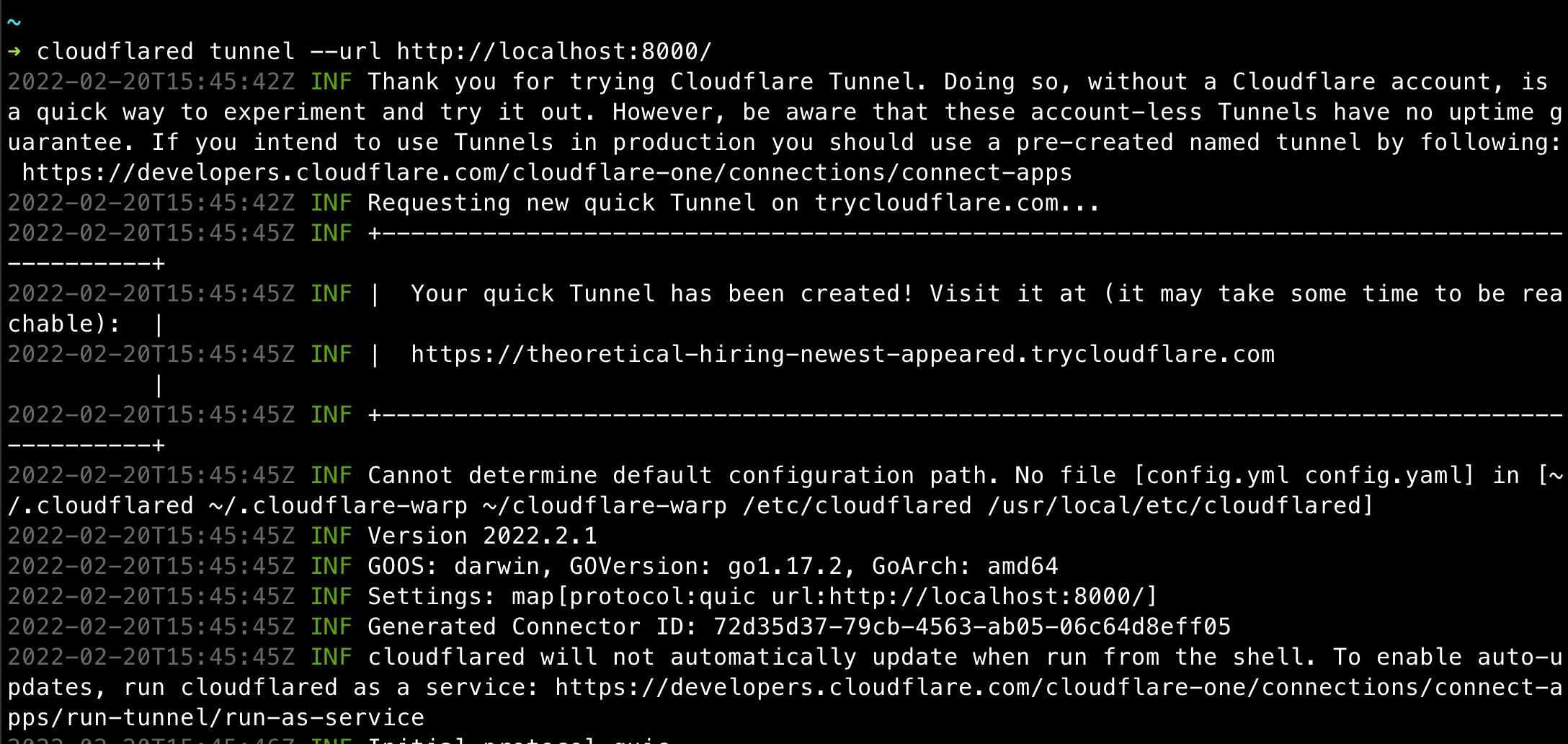
<p>The output should look like something below. The tunnel url is also provided in the output. Hit the tunnel url and the website should be accessible to the world.</p>

<p><img src="/assets/2022-02-20-cloudflare-tunnels/cloudflared-output.png" alt="Hello Cloudflare Tunnel" /></p>

<h2 id="running-tunnels-with-permanent-domains-or-subdomains">Running tunnels with permanent domains or subdomains</h2>

<p>This requires a domain on your Cloudflare account that you can use for the tunnel.</p>

<h4 id="login-to-cloudflare-and-authorise-use-of-one-of-the-domains">Login to Cloudflare and authorise use of one of the domains</h4>

<div class="language-shell highlighter-rouge"><div class="highlight"><pre class="highlight"><code>cloudflared tunnel login
</code></pre></div></div>

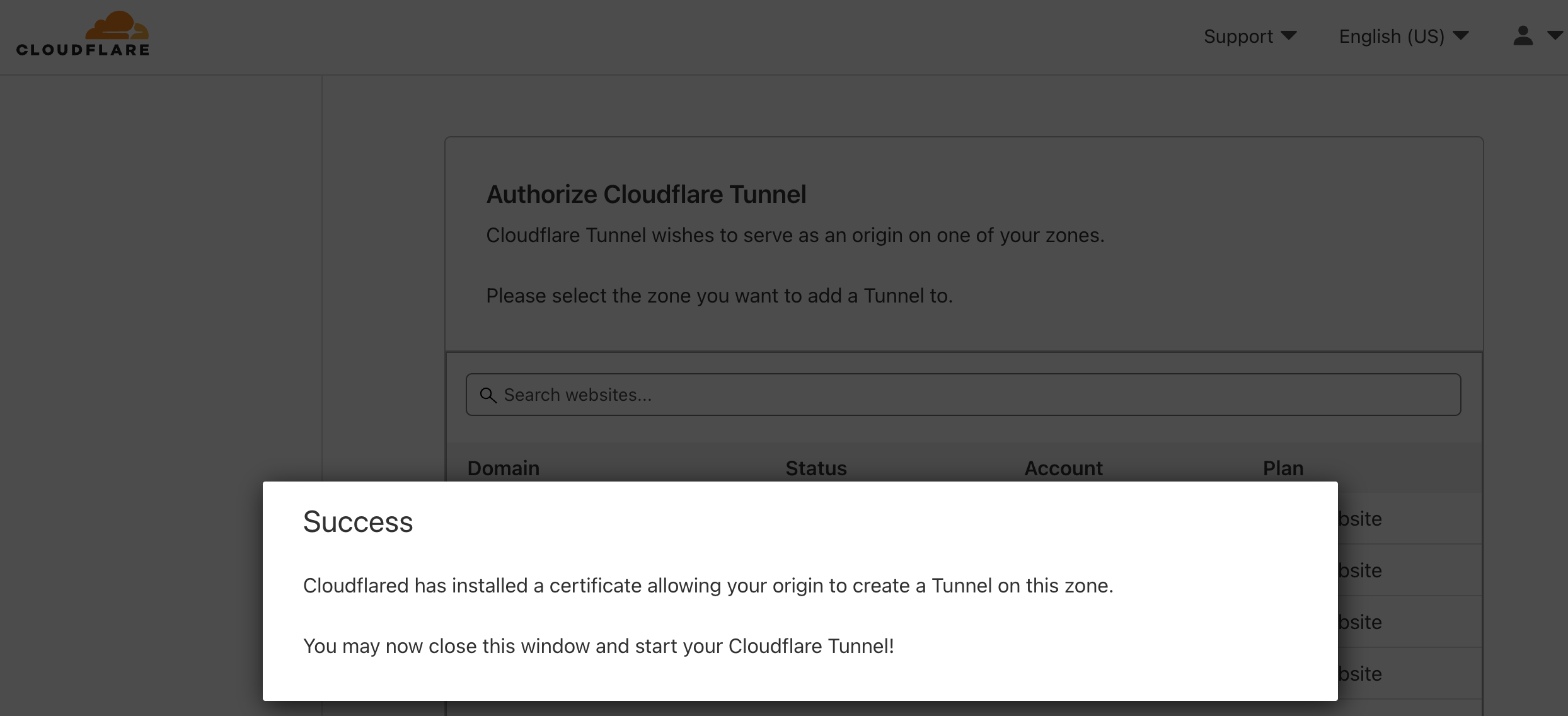
<p>You will be prompted to authorize one of your domains to use for your tunnels. Pick one and that completes the setup.</p>

<p><img src="/assets/2022-02-20-cloudflare-tunnels/cloudflare-authorize.png" alt="Authorize cloudflare to use a domain for the tunnels" /></p>

<h4 id="start-a-tunnel-with-the-required-domain-or-subdomain">Start a tunnel with the required domain or subdomain.</h4>

<p>I am using one of my domains to play with.</p>

<div class="language-plaintext highlighter-rouge"><div class="highlight"><pre class="highlight"><code>cloudflared tunnel --hostname myapp.define.run --url http://localhost:8000
</code></pre></div></div>

<p>The website should now be accessible at the desired subdomain 😃</p>]]></content><author><name></name></author><summary type="html"><![CDATA[Cloudflare Tunnels is the newest alternative to tools like Ngrok and localtunnel. These tools help expose locally hosted apps and websites to the internet.]]></summary></entry><entry><title type="html">Attention to detail as your north star</title><link href="/2022/02/03/details.html" rel="alternate" type="text/html" title="Attention to detail as your north star" /><published>2022-02-03T19:49:09+00:00</published><updated>2022-02-03T19:49:09+00:00</updated><id>/2022/02/03/details</id><content type="html" xml:base="/2022/02/03/details.html"><![CDATA[<blockquote>
  <p>This post is in response to a <a href="https://news.ycombinator.com/item?id=30191017">Hacker News</a> thread about being slow to produce work.</p>
</blockquote>

<p>The kind of person the author seems to envy in the post are people who are most likely pattern-matching against past experience. I attribute this quick thinking to having come across those same/similar problem statements earlier. But getting there requires a good understanding of the problem space. This can only be done by spending time in the problem space and paying attention to details.</p>

<p>When working on a new problem these days. I feel like I slow down too. I now tend to go for the details. What I cannot make up in speed, I make up for with detailed solutions, thinking from the user’s perspective, staying aware of trade-offs, watching out for unhandled scenarios, etc.</p>

<p>I also document all my work. Whenever I start working on a problem/ticket/issue, I create a new note in my personal note-taking tool. I document the commands, the new findings, etc.</p>

<p><strong>Fun fact:</strong> For a limited time, I fulfilled the role of a Product Manager at my recent workplace. The engineers I worked with loved the amount of detailing in my product specifications. This was the result of slowing down and paying attention to the details. The above qualities/choices also resulted in me playing the implicit role of QA for the team. The concept of “implicit roles” is explained pretty well in <a href="https://staysaasy.com/management/2021/01/21/Step-Back.html">this blog post</a> on the StaySassy blog.</p>

<p>I try to compensate my slowness with attention to detail, clear communication and better documentation.</p>

<p>Attention to detail is as good a quality as quick thinking. I like this way better.</p>]]></content><author><name></name></author><summary type="html"><![CDATA[This post is in response to a Hacker News thread about being slow to produce work. The kind of person the author seems to envy in the post are people who are most likely pattern-matching against past experience. I attribute this quick thinking to having come across those same/similar problem statements earlier. But getting there requires a good understanding of the problem space. This can only be done by spending time in the problem space and paying attention to details. When working on a new problem these days. I feel like I slow down too. I now tend to go for the details. What I cannot make up in speed, I make up for with detailed solutions, thinking from the user’s perspective, staying aware of trade-offs, watching out for unhandled scenarios, etc. I also document all my work. Whenever I start working on a problem/ticket/issue, I create a new note in my personal note-taking tool. I document the commands, the new findings, etc. Fun fact: For a limited time, I fulfilled the role of a Product Manager at my recent workplace. The engineers I worked with loved the amount of detailing in my product specifications. This was the result of slowing down and paying attention to the details. The above qualities/choices also resulted in me playing the implicit role of QA for the team. The concept of “implicit roles” is explained pretty well in this blog post on the StaySassy blog. I try to compensate my slowness with attention to detail, clear communication and better documentation. Attention to detail is as good a quality as quick thinking. I like this way better.]]></summary></entry><entry><title type="html">Questions to ask potential employers</title><link href="/posts/questions-for-potential-employers" rel="alternate" type="text/html" title="Questions to ask potential employers" /><published>2021-11-29T16:42:03+00:00</published><updated>2021-11-29T16:42:03+00:00</updated><id>/posts/questions-for-potential-employers</id><content type="html" xml:base="/posts/questions-for-potential-employers"><![CDATA[<blockquote>
  <p><strong>UPDATE: In a post-chatgpt world, this post needs a lot of updates.</strong></p>
</blockquote>

<p>If you are interviewing with companies, these notes should help ask questions and know what is in it for you.</p>

<!--more-->

<h2 id="ask-to-know-more-about-product--roadmap">Ask to know more about product &amp; roadmap</h2>

<p>Use this information to understand/guesstimate if the company has the potential to increase revenue.</p>

<h4 id="ask-for-a-product-demo">Ask for a product demo</h4>
<ul>
  <li>Getting to know the product in detail helps.</li>
  <li>Also ask for login credentials for a test account to play with.</li>
</ul>

<h4 id="what-is-the-product-roadmap">What is the product roadmap?</h4>
<ul>
  <li>How do items get into the roadmap and how do they get prioritized?</li>
  <li>To check if the product development is stagnant. <a href="https://en.wikipedia.org/wiki/Busy_work">Busy work</a> is bad work.</li>
</ul>

<h4 id="who-are-the-target-customers-now-is-the-company-planning-to-focus-on-other-cohorts-of-customers">Who are the target customers now? Is the company planning to focus on other cohorts of customers?</h4>
<ul>
  <li>Use this to check/guess the possible size of market using other sources.</li>
  <li>For example: If target customers are small businesses that sell clothing, find other industry reports that offer insights/numbers for potential market size that this company can possibly grow to serve.</li>
</ul>

<h4 id="what-was-last-years-product-roadmap-vs-what-was-worked-on-last-year">What was last year’s product roadmap vs what was worked on last year?</h4>
<ul>
  <li>Helps to know how often the company changes priorities.</li>
  <li>If priority changes are too often, then focus gets scattered for product engineering.</li>
</ul>

<blockquote>
  <p>It is very important to understand that product development can be a hit or miss during the early stages of a company. So some things might be in flux. Just not everything can be in flux.</p>
</blockquote>

<h2 id="special-note-frequently-changing-roadmap">Special note: Frequently changing roadmap</h2>

<ul>
  <li><strong>Selling to bad-fit customers</strong>: A lot of deals require customization that forces trading-off already planned roadmap items. These customizations are very good if they are reusable - means sales is able to utilize the customizations to sell to more customers that need these. These trade-offs come at the cost of product stability. The more code written for specific customers, the larger and unmaintainable the code-base becomes. This in turn leads to increased technical debt and slower development.</li>
  <li><strong>Lack of Product-Market fit</strong>: Company scaled to $X in revenue selling to a cohort of customers. But new cohort of customers require a bunch of other features that do not exist today.</li>
  <li><strong>Lack of focus to iterate/improve existing functionality:</strong> This happens as a result of focusing too much on building new things.</li>
</ul>

<h2 id="find-out-about-plans-for-the-role-being-hired-for">Find out about plans for the role being hired for</h2>

<ul>
  <li>Based on responsibilities of the role and the product roadmap, decide if the role being hired for is important enough for you to work and grow there.</li>
  <li>For example, if being hired for as a Mobile Engineer and mobile apps are low on the roadmap, then the role is likely to be at risk in the near future after the project is done.</li>
  <li>If the company cannot list out work for at least a year, then the company is better-off hiring a contractor for this role instead of a full-time employee.</li>
</ul>

<h4 id="are-there-enough-supporting-functions-for-the-role-to-succeed">Are there enough supporting functions for the role to succeed?</h4>
<ul>
  <li>For example: For a mobile engineer position, is the product line important? Is there a product manager assigned?</li>
</ul>

<h2 id="ask-details-to-understand-esops-better">Ask details to understand ESOPs better</h2>

<p>Someone I know articulated it better: <em>“Salary is for today’s work. ESOPs are for stickiness”</em>. Stickiness is what encourages an employee to stay invested in the company rather than switching workplaces after a year.</p>

<p>The below details are good to discuss/ask on a call, but also ensure to get these on an email to keep these on record.</p>

<h4 id="what-is-the-current-fmv-of-the-share-the-exercise-price-and-the-total-number-of-shares-in-the-pool">What is the <em>current FMV</em> of the share, the <em>Exercise Price</em> and the total number of shares in the pool?</h4>
<ul>
  <li>ESOPs are “alloted” to you by the company at regular intervals. This is like “permission to buy”. To own these, you must buy them at an exercise price.</li>
  <li>People with ESOPs make money when the company is sold or goes for an IPO. To know what you would make as a “profit” in this sale, you must know the price you are allowed to buy at. This is the exercise price (or the strike price).</li>
  <li>You may be offered an exercise price at a discount compared to the actual market value of the share. This market value of the share is the Fair Market Value (FMV).</li>
  <li>FMV cannot be a random number based on what someone feels - companies generally do a 409A valuation with an auditor.</li>
  <li>To aid in understanding valuation, also find out total number of shares in the pool. Useful to know, what percentage you are being assigned. Check common practices for early employees and the value you might add.</li>
  <li>Read up on why <em>FMV</em> and <em>Exercise Price</em> are important to know. There is already a lot of literature on this.</li>
</ul>

<p>Based on the roadmap, the market size and the competition, if you think the company will increase revenue (say 4x or 10x) in the next few years, then use these numbers to see what your upside or financial gains will be. Ofcourse there might be dilution, liquidation preferences, etc, when the company raises a round of funding. But knowing these numbers atleast gives you information to guess ballpark numbers of what you would make as a financial gain.</p>

<h4 id="does-the-company-provide-liquidity-opportunities-for-employees">Does the company provide liquidity opportunities for employees?</h4>
<ul>
  <li>ESOPs are good. But if there is no way to liquidate them to cash, then the ESOPs are worth paper-money and useless. Find out what are the company’s plans for offering liquidity to employees with ESOPs.</li>
  <li>When was the last liquidity opportunity and who was it offered to? (Example: Employees that stayed for 2yrs, 4yrs, etc).</li>
</ul>

<h4 id="does-the-company-offer-esops-with-a-10-year-exercise-window">Does the company offer ESOPs with a 10-year exercise window?</h4>
<ul>
  <li>Guideline: Workplaces that have an exercise window of 30-90 days is a red-flag.</li>
  <li>If you quit the company after 2yrs, all the shares you vested must be exercised within the “exercise window” after you quit (say 30-90 days depending on the company’s policy). Else you forfeit the right to purchase the alloted shares.</li>
  <li>This is bad because employees might not have the cash to purchase an asset (company shares) that do not have liquidity and comes with an unknown probablity of making a profit.</li>
  <li>This is also bad because if you work for a company in a geography that has to adhere to “Perquisite tax” mentioned above, then you also have to pay the tax on the paper-profit that you have not yet made.</li>
  <li>Having a long exercise window of 10 years is a good thing, because after the employee feels his potential/peak at the company is past, they have the oppurtunity to move on and still have 10 years to exercise the vested shares depending on the potential upside.</li>
  <li>10-yr exercise window is a good expectation to have. Anyone saying otherwise is probably BS-ing you. Give it a thought - do you expect to work at the same workplace for 7 years or are you more likely to get bored?</li>
  <li><a href="https://github.com/holman/extended-exercise-windows">Check companies offering that</a>.</li>
</ul>

<h4 id="special-mention-perquisite-tax-on-esops-in-india">Special mention: Perquisite tax on ESOPs in India</h4>

<ul>
  <li>The “Perquisite Tax” means that if you are exercising (buying) shares at a lower than market value (FMV), then you have to pay tax on the difference (the notional profit).</li>
  <li>This government counts this as profit you have made because you purchased an asset of higher value for a cheaper price. The absolutely bonkers fact: This only applies to ESOPs.</li>
</ul>

<h4 id="special-mention-esops-as-golden-hand-cuffs">Special mention: ESOPs as golden hand-cuffs</h4>

<ul>
  <li>ESOPs are called “golden handcuffs” for a reason. If you cannot afford to exercise the shares you have vested, the fear of not missing out on the potential profit would prevent you from quitting.</li>
  <li>Being able to afford to exercise large ESOPs with uncertain liquidity is a luxury that employees cannot afford in certain geographies. Especially in India, there is a “Perquisite Tax” to be paid on the ESOPs during exercise.</li>
</ul>

<blockquote>
  <p>Checkout <a href="https://twitter.com/HashNuke/status/1375134640143360002">this Twitter thread</a></p>
</blockquote>

<h4 id="special-mention-on-esop-buybacks">Special mention on ESOP buybacks</h4>

<p><a href="https://twitter.com/Nithin0dha/status/1464590485582794756">Nithin Kamath’s tweet</a> - read his entire Twitter thread.</p>

<h2 id="other-details">Other details</h2>

<h4 id="does-the-company-have-an-employee-stock-purchase-plan-applies-to-public-companies-only">Does the company have an Employee Stock Purchase Plan? (applies to public companies only)</h4>
<ul>
  <li>What are the details of the ESPP?</li>
  <li>If the employer is a public company, they can help you purchase listed shares at a discounted price.</li>
</ul>

<h4 id="how-many-leaves-do-employees-get-per-year">How many leaves do employees get per year?</h4>
<ul>
  <li>Are employees allowed to carry-forward unused leaves?</li>
  <li>Unlimited leaves are BS. Get an absolute number that employees are allowed per year.</li>
  <li>Check for maternity &amp; paternity leaves. You may not be expanding your family. But this is an indicator of compassion.</li>
</ul>

<h4 id="does-the-company-work-remote-how-does-the-team-collaborate">Does the company work remote? How does the team collaborate?</h4>
<ul>
  <li>If remote work is what you want, check about it.</li>
  <li>What are the expected work hours? If you are uncomfortable with frequent meetings outside of your preferred/usual work hours, check about that too.</li>
  <li>Choosing a timezone for a globally distributed organization is acceptable. But internal meetings being setup always/frequently in a particular timezone is being biased and is a red-flag indicating not respecting personal time.</li>
</ul>

<h4 id="is-the-company-providing-you-with-necessary-tools">Is the company providing you with necessary tools?</h4>
<ul>
  <li>If you have to go through a week of approvals &amp; discussion to buy a $29 tool for your team, it means the company isn’t seeing value in what you are doing.</li>
</ul>

<h2 id="finale">Finale</h2>

<h4 id="what-if-you-join-the-company-and-find-out-that-the-company-lied-about-certain-details">What if you join the company and find out that the company lied about certain details?</h4>
<p><a href="https://thedecisionlab.com/biases/the-sunk-cost-fallacy/">Sunk cost</a>. Find a new workplace immediately.</p>

<h4 id="what-if-the-potential-employer-is-not-willing-to-reveal-details">What if the potential employer is not willing to reveal details?</h4>
<ul>
  <li>They’ll find another engineer. You find another workplace.</li>
  <li>You are going to spend a significant part of your time/life working at this place. If you do not have enough details to judge the workplace, skip the workplace. This will save you some ache in the long run.</li>
</ul>

<h4 id="i-spent-time-a-few-years-at-a-workplace-without-these-details-what-to-do">I spent time a few years at a workplace without these details. What to do?</h4>
<ul>
  <li>Talk to someone at your workplace and ask for these details.</li>
  <li>If details are still unclear after talking to an appropriate person, then probably consider it <a href="https://thedecisionlab.com/biases/the-sunk-cost-fallacy/">sunk cost</a>, so find a new workplace.</li>
</ul>]]></content><author><name></name></author><summary type="html"><![CDATA[UPDATE: In a post-chatgpt world, this post needs a lot of updates. If you are interviewing with companies, these notes should help ask questions and know what is in it for you.]]></summary></entry><entry><title type="html">Notes on the tar command</title><link href="/2021/09/22/tar.html" rel="alternate" type="text/html" title="Notes on the tar command" /><published>2021-09-22T19:05:18+00:00</published><updated>2021-09-22T19:05:18+00:00</updated><id>/2021/09/22/tar</id><content type="html" xml:base="/2021/09/22/tar.html"><![CDATA[<blockquote>
  <p>These notes were taken when making some changes for <a href="https://github.com/cncf/cnf-testsuite">cncf/cnf-testsuite</a>. I had to understand the options being used with the tar command before making the changes.</p>
</blockquote>

<p>These commands work fine on linux. But if on Mac, install <code class="language-plaintext highlighter-rouge">gnu-tar</code> with brew to get these commands working as expected.</p>

<h2 id="extract-and-compress">Extract and compress</h2>

<div class="language-plaintext highlighter-rouge"><div class="highlight"><pre class="highlight"><code># hello is a directory
$ ls .
hello tryouts somedir

# Compress
$ tar czvf hello.tar.gz hello

# Change to a directory to experiment
$ cd tryouts &amp;&amp; mv ../hello.tar.gz .

# Extract
$ tar zxvf hello.tar.gz
$ ls
hello

# Cleanup
$ cd .. &amp;&amp; rm -rf tryouts
</code></pre></div></div>

<h2 id="change-directory-when-compressing">Change directory when compressing</h2>
<div class="language-plaintext highlighter-rouge"><div class="highlight"><pre class="highlight"><code># hello has two directories
$ ls hello
world greeting

# Compress, with change directory option
$ tar czvf hello.tar.gz -C hello .

# Change to a directory to experiment
$ cd tryouts &amp;&amp; mv ../hello.tar.gz .

# Extract
$ tar zxvf hello.tar.gz
$ ls
hello.tar.gz world greeting

# Notice magic? No parent directory when extracting
</code></pre></div></div>

<h2 id="compress-only-select-directoriesfiles">Compress only select directories/files</h2>
<div class="language-plaintext highlighter-rouge"><div class="highlight"><pre class="highlight"><code># hello has two directories
$ ls hello
world greeting

# Compress, with change directory option and select world dir only
$ tar czvf hello.tar.gz -C hello world

# Change to a directory to experiment
$ cd tryouts &amp;&amp; mv ../hello.tar.gz .

# Extract
$ tar zxvf hello.tar.gz
$ ls
hello.tar.gz world

# See? No greeting dir because we did not compress it
</code></pre></div></div>]]></content><author><name></name></author><summary type="html"><![CDATA[These notes were taken when making some changes for cncf/cnf-testsuite. I had to understand the options being used with the tar command before making the changes. These commands work fine on linux. But if on Mac, install gnu-tar with brew to get these commands working as expected. Extract and compress # hello is a directory $ ls . hello tryouts somedir # Compress $ tar czvf hello.tar.gz hello # Change to a directory to experiment $ cd tryouts &amp;&amp; mv ../hello.tar.gz . # Extract $ tar zxvf hello.tar.gz $ ls hello # Cleanup $ cd .. &amp;&amp; rm -rf tryouts Change directory when compressing # hello has two directories $ ls hello world greeting # Compress, with change directory option $ tar czvf hello.tar.gz -C hello . # Change to a directory to experiment $ cd tryouts &amp;&amp; mv ../hello.tar.gz . # Extract $ tar zxvf hello.tar.gz $ ls hello.tar.gz world greeting # Notice magic? No parent directory when extracting Compress only select directories/files # hello has two directories $ ls hello world greeting # Compress, with change directory option and select world dir only $ tar czvf hello.tar.gz -C hello world # Change to a directory to experiment $ cd tryouts &amp;&amp; mv ../hello.tar.gz . # Extract $ tar zxvf hello.tar.gz $ ls hello.tar.gz world # See? No greeting dir because we did not compress it]]></summary></entry><entry><title type="html">Dev notes: aws-cdk not updating Lambda function</title><link href="/2021/09/21/cdk-not-updating-lambda.html" rel="alternate" type="text/html" title="Dev notes: aws-cdk not updating Lambda function" /><published>2021-09-21T04:00:01+00:00</published><updated>2021-09-21T04:00:01+00:00</updated><id>/2021/09/21/cdk-not-updating-lambda</id><content type="html" xml:base="/2021/09/21/cdk-not-updating-lambda.html"><![CDATA[<p>So you created a Lambda function via aws-cdk. The first deploy worked fine and you were able to try the function. When attempting to deploy an update of the function, no changes are deployed. The output of the <code class="language-plaintext highlighter-rouge">cdk diff</code> command says “There were no differences”.</p>

<p>When using the aws-cdk Lambda docs and examples, the code for the Lambda function is fetched by <code class="language-plaintext highlighter-rouge">lambda.Code.fromAsset()</code> This is from a local directory within the cdk project and works as expected because the cdk is able to calculate a hash of the files to detect a change in the code.</p>

<p>My GitHub Actions workflow was pushing zip files to S3 containing the code for the Lambda functions. This meant that I use <code class="language-plaintext highlighter-rouge">lambda.Code.fromBucket</code>.</p>

<p>Something like this:</p>

<div class="language-typescript highlighter-rouge"><div class="highlight"><pre class="highlight"><code>
<span class="c1">// bucket is of type Bucket construct from aws-cdk/aws-s3 package.</span>

<span class="c1">// This is path of the release zip file in s3.</span>
<span class="kd">const</span> <span class="nx">releaseFileKey</span> <span class="o">=</span> <span class="dl">"</span><span class="s2">my-function/latest.zip</span><span class="dl">"</span>

<span class="kd">const</span> <span class="nx">fn</span> <span class="o">=</span> <span class="k">new</span> <span class="nx">lambda</span><span class="p">.</span><span class="nc">Function</span><span class="p">(</span><span class="k">this</span><span class="p">,</span> <span class="dl">'</span><span class="s1">MyFunction</span><span class="dl">'</span><span class="p">,</span> <span class="p">{</span>
  <span class="na">runtime</span><span class="p">:</span> <span class="nx">lambda</span><span class="p">.</span><span class="nx">Runtime</span><span class="p">.</span><span class="nx">NODEJS_14_X</span><span class="p">,</span>
  <span class="na">handler</span><span class="p">:</span> <span class="dl">'</span><span class="s1">handler.hello</span><span class="dl">'</span><span class="p">,</span>
  <span class="na">code</span><span class="p">:</span> <span class="nx">lambda</span><span class="p">.</span><span class="nx">Code</span><span class="p">.</span><span class="nf">fromBucket</span><span class="p">(</span><span class="nx">bucket</span><span class="p">,</span> <span class="nx">releaseFileKey</span><span class="p">)</span>
<span class="p">})</span>
</code></pre></div></div>

<p>cdk would not detect updates to the lambda function. There are some notes in the cdk documentation that mentions passing the version options to inform cdk that an update is being made.</p>

<p>I was looking for a mechanism to be able to pass the version of the lambda function to deploy, to the <code class="language-plaintext highlighter-rouge">cdk deploy</code> command. I definitely do not want to be updating the s3 release file name in the stack definitions manually everytime I want to deploy.</p>

<p>I stumbled upon <code class="language-plaintext highlighter-rouge">CfnParameters</code>. This can be used to pass parameters to the cdk on the command line.</p>

<p>I made some code changes to read <code class="language-plaintext highlighter-rouge">releaseFileKey</code> using <code class="language-plaintext highlighter-rouge">CfnParameter</code>. Here is how I would pass the release file key in the command line.</p>

<div class="language-shell highlighter-rouge"><div class="highlight"><pre class="highlight"><code><span class="nv">$ </span>cdk deploy MyAppStack <span class="se">\</span>
    <span class="nt">--parameter</span> MyAppStack:releaseFileKey<span class="o">=</span>my-function/3badf1b7.zip
</code></pre></div></div>

<p>Nope - that did not work. The Lambda function still wasn’t being updated when I passed a new file key that included the git commit SHA in the file name. When I opened the CloudFormation templates in <code class="language-plaintext highlighter-rouge">cdk.out</code> dir, I noticed that the places where I was expected to see the release file key, there was something like <code class="language-plaintext highlighter-rouge">{"ref": "releaseFileKey"}</code>.</p>

<p>I learnt that these CfnParameters are CloudFormation parameters that are injected during deploy time. The CloudFormation templates generated by cdk would always have placeholders for these parameters and therefore the cdk would not detect any changes to deploy.</p>

<h2 id="solutions-that-worked">Solutions that worked</h2>

<h3 id="option-1-read-the-s3-file-key-from-environment-variables">Option-1: Read the S3 file key from environment variables</h3>

<div class="language-typescript highlighter-rouge"><div class="highlight"><pre class="highlight"><code><span class="kd">const</span> <span class="nx">fn</span> <span class="o">=</span> <span class="k">new</span> <span class="nx">lambda</span><span class="p">.</span><span class="nc">Function</span><span class="p">(</span><span class="k">this</span><span class="p">,</span> <span class="dl">'</span><span class="s1">MyFunction</span><span class="dl">'</span><span class="p">,</span> <span class="p">{</span>
  <span class="na">runtime</span><span class="p">:</span> <span class="nx">lambda</span><span class="p">.</span><span class="nx">Runtime</span><span class="p">.</span><span class="nx">NODEJS_14_X</span><span class="p">,</span>
  <span class="na">handler</span><span class="p">:</span> <span class="dl">'</span><span class="s1">handler.hello</span><span class="dl">'</span><span class="p">,</span>
  <span class="na">code</span><span class="p">:</span> <span class="nx">lambda</span><span class="p">.</span><span class="nx">Code</span><span class="p">.</span><span class="nf">fromBucket</span><span class="p">(</span><span class="nx">bucket</span><span class="p">,</span> <span class="nx">process</span><span class="p">.</span><span class="nx">env</span><span class="p">.</span><span class="nx">RELEASE_FILE</span><span class="p">)</span>
<span class="p">})</span>
</code></pre></div></div>

<p>Run the diff command now and you’ll notice cdk is detecting changes to the stack and will update the Lambda function.</p>

<div class="language-shell highlighter-rouge"><div class="highlight"><pre class="highlight"><code><span class="nv">RELEASE_FILE</span><span class="o">=</span><span class="s2">"my-function/3badf1b7.zip"</span> cdk diff <span class="nt">--all</span>
</code></pre></div></div>

<h3 id="option-2-add-the-code-version-as-an-env-var-that-is-passed-to-the-lambda-function">Option-2: Add the code version as an env var that is passed to the Lambda function</h3>

<p>Incase your S3 file name always remains the same, then the other option is to pass some environment variable to your Lambda function that always changes when your code changes.</p>

<p>The easy way is to pass the git commit SHA like below.</p>

<div class="language-typescript highlighter-rouge"><div class="highlight"><pre class="highlight"><code><span class="kd">const</span> <span class="nx">fn</span> <span class="o">=</span> <span class="k">new</span> <span class="nx">lambda</span><span class="p">.</span><span class="nc">Function</span><span class="p">(</span><span class="k">this</span><span class="p">,</span> <span class="dl">'</span><span class="s1">MyFunction</span><span class="dl">'</span><span class="p">,</span> <span class="p">{</span>
  <span class="na">runtime</span><span class="p">:</span> <span class="nx">lambda</span><span class="p">.</span><span class="nx">Runtime</span><span class="p">.</span><span class="nx">NODEJS_14_X</span><span class="p">,</span>
  <span class="na">handler</span><span class="p">:</span> <span class="dl">'</span><span class="s1">handler.hello</span><span class="dl">'</span><span class="p">,</span>
  <span class="na">code</span><span class="p">:</span> <span class="nx">lambda</span><span class="p">.</span><span class="nx">Code</span><span class="p">.</span><span class="nf">fromBucket</span><span class="p">(</span><span class="nx">bucket</span><span class="p">,</span> <span class="dl">"</span><span class="s2">my-function/latest.zip</span><span class="dl">"</span><span class="p">)</span>
  <span class="na">environment</span><span class="p">:</span> <span class="p">{</span>
    <span class="na">GIT_VERSION</span><span class="p">:</span> <span class="nx">process</span><span class="p">.</span><span class="nx">env</span><span class="p">.</span><span class="nx">RELEASE_VERSION</span>
  <span class="p">}</span>
<span class="p">})</span>
</code></pre></div></div>

<p>And then pass the env var to the diff or deploy commands like this.</p>

<div class="language-shell highlighter-rouge"><div class="highlight"><pre class="highlight"><code><span class="nv">RELEASE_VERSION</span><span class="o">=</span><span class="s2">"3badf1b7"</span> cdk diff <span class="nt">--all</span>
</code></pre></div></div>

<h3 id="option-3-pass-version-options-to-lambdafunction">Option-3: Pass version options to lambda.Function</h3>

<p>You can also pass the version options to <code class="language-plaintext highlighter-rouge">lambda.Function</code> like below. But it is required that you access the <code class="language-plaintext highlighter-rouge">currentVersion</code> property after the lambda function is declared. This ensures that the version is output to the CloudFormation template. Notice the last line in the snippet below.</p>

<p>If you notice below, the snippet still reads the release version from an env var.</p>

<div class="language-typescript highlighter-rouge"><div class="highlight"><pre class="highlight"><code><span class="kd">const</span> <span class="nx">fn</span> <span class="o">=</span> <span class="k">new</span> <span class="nx">lambda</span><span class="p">.</span><span class="nc">Function</span><span class="p">(</span><span class="k">this</span><span class="p">,</span> <span class="dl">'</span><span class="s1">MyFunction</span><span class="dl">'</span><span class="p">,</span> <span class="p">{</span>
  <span class="na">runtime</span><span class="p">:</span> <span class="nx">lambda</span><span class="p">.</span><span class="nx">Runtime</span><span class="p">.</span><span class="nx">NODEJS_14_X</span><span class="p">,</span>
  <span class="na">handler</span><span class="p">:</span> <span class="dl">'</span><span class="s1">handler.hello</span><span class="dl">'</span><span class="p">,</span>
  <span class="na">code</span><span class="p">:</span> <span class="nx">lambda</span><span class="p">.</span><span class="nx">Code</span><span class="p">.</span><span class="nf">fromBucket</span><span class="p">(</span><span class="nx">bucket</span><span class="p">,</span> <span class="dl">"</span><span class="s2">my-function/latest.zip</span><span class="dl">"</span><span class="p">)</span>
  <span class="na">currentVersionOptions</span><span class="p">:</span> <span class="p">{</span>
    <span class="na">codeSha256</span><span class="p">:</span> <span class="nx">process</span><span class="p">.</span><span class="nx">env</span><span class="p">.</span><span class="nx">RELEASE_VERSION</span>
  <span class="p">}</span>
<span class="p">})</span>

<span class="nx">fn</span><span class="p">.</span><span class="nx">currentVersion</span>
</code></pre></div></div>

<p>Try running the cdk diff or deploy commands with <code class="language-plaintext highlighter-rouge">RELEASE_VERSION</code> env var.</p>

<div class="language-shell highlighter-rouge"><div class="highlight"><pre class="highlight"><code><span class="nv">RELEASE_VERSION</span><span class="o">=</span><span class="s2">"3badf1b7"</span> cdk diff <span class="nt">--all</span>
</code></pre></div></div>]]></content><author><name></name></author><summary type="html"><![CDATA[So you created a Lambda function via aws-cdk. The first deploy worked fine and you were able to try the function. When attempting to deploy an update of the function, no changes are deployed. The output of the cdk diff command says “There were no differences”. When using the aws-cdk Lambda docs and examples, the code for the Lambda function is fetched by lambda.Code.fromAsset() This is from a local directory within the cdk project and works as expected because the cdk is able to calculate a hash of the files to detect a change in the code. My GitHub Actions workflow was pushing zip files to S3 containing the code for the Lambda functions. This meant that I use lambda.Code.fromBucket. Something like this: // bucket is of type Bucket construct from aws-cdk/aws-s3 package. // This is path of the release zip file in s3. const releaseFileKey = "my-function/latest.zip" const fn = new lambda.Function(this, 'MyFunction', { runtime: lambda.Runtime.NODEJS_14_X, handler: 'handler.hello', code: lambda.Code.fromBucket(bucket, releaseFileKey) }) cdk would not detect updates to the lambda function. There are some notes in the cdk documentation that mentions passing the version options to inform cdk that an update is being made. I was looking for a mechanism to be able to pass the version of the lambda function to deploy, to the cdk deploy command. I definitely do not want to be updating the s3 release file name in the stack definitions manually everytime I want to deploy. I stumbled upon CfnParameters. This can be used to pass parameters to the cdk on the command line. I made some code changes to read releaseFileKey using CfnParameter. Here is how I would pass the release file key in the command line. $ cdk deploy MyAppStack \ --parameter MyAppStack:releaseFileKey=my-function/3badf1b7.zip Nope - that did not work. The Lambda function still wasn’t being updated when I passed a new file key that included the git commit SHA in the file name. When I opened the CloudFormation templates in cdk.out dir, I noticed that the places where I was expected to see the release file key, there was something like {"ref": "releaseFileKey"}. I learnt that these CfnParameters are CloudFormation parameters that are injected during deploy time. The CloudFormation templates generated by cdk would always have placeholders for these parameters and therefore the cdk would not detect any changes to deploy. Solutions that worked Option-1: Read the S3 file key from environment variables const fn = new lambda.Function(this, 'MyFunction', { runtime: lambda.Runtime.NODEJS_14_X, handler: 'handler.hello', code: lambda.Code.fromBucket(bucket, process.env.RELEASE_FILE) }) Run the diff command now and you’ll notice cdk is detecting changes to the stack and will update the Lambda function. RELEASE_FILE="my-function/3badf1b7.zip" cdk diff --all Option-2: Add the code version as an env var that is passed to the Lambda function Incase your S3 file name always remains the same, then the other option is to pass some environment variable to your Lambda function that always changes when your code changes. The easy way is to pass the git commit SHA like below. const fn = new lambda.Function(this, 'MyFunction', { runtime: lambda.Runtime.NODEJS_14_X, handler: 'handler.hello', code: lambda.Code.fromBucket(bucket, "my-function/latest.zip") environment: { GIT_VERSION: process.env.RELEASE_VERSION } }) And then pass the env var to the diff or deploy commands like this. RELEASE_VERSION="3badf1b7" cdk diff --all Option-3: Pass version options to lambda.Function You can also pass the version options to lambda.Function like below. But it is required that you access the currentVersion property after the lambda function is declared. This ensures that the version is output to the CloudFormation template. Notice the last line in the snippet below. If you notice below, the snippet still reads the release version from an env var. const fn = new lambda.Function(this, 'MyFunction', { runtime: lambda.Runtime.NODEJS_14_X, handler: 'handler.hello', code: lambda.Code.fromBucket(bucket, "my-function/latest.zip") currentVersionOptions: { codeSha256: process.env.RELEASE_VERSION } }) fn.currentVersion Try running the cdk diff or deploy commands with RELEASE_VERSION env var. RELEASE_VERSION="3badf1b7" cdk diff --all]]></summary></entry><entry><title type="html">Building a custom QMK firmware</title><link href="/2021/07/15/building-qmk-firmware.html" rel="alternate" type="text/html" title="Building a custom QMK firmware" /><published>2021-07-15T06:50:13+00:00</published><updated>2021-07-15T06:50:13+00:00</updated><id>/2021/07/15/building-qmk-firmware</id><content type="html" xml:base="/2021/07/15/building-qmk-firmware.html"><![CDATA[<p>I’ve been used to Tap Dance and AutoShift on the Planck EZ and I wanted the same on my Preonic. This led me to find out that <a href="https://config.qmk.fm/">QMK Configurator</a> does not support the features out of the box. Downloading the QMK firmware and customising it is the only way.</p>

<h2 id="first-step-install-qmk">First step: Install qmk</h2>
<p>For Mac OS, using homebrew for  installation.</p>

<div class="language-plaintext highlighter-rouge"><div class="highlight"><pre class="highlight"><code>brew install qmk
</code></pre></div></div>

<p>Install some dependencies using <a href="https://github.com/samhocevar-forks/qmk-firmware/blob/master/docs/getting_started_build_tools.md">this doc as a reference</a></p>

<p>Setup QMK using the below command. This will download the QMK firmware for you and if required install any dependencies. On my Mac and this took about 5min.</p>

<div class="language-plaintext highlighter-rouge"><div class="highlight"><pre class="highlight"><code>qmk setup
</code></pre></div></div>

<p>The output should look like this - along with some git clone to clone the repo. (This is the output when qmk setup is run for the second time).</p>

<div class="language-plaintext highlighter-rouge"><div class="highlight"><pre class="highlight"><code>$ qmk setup
Ψ Found qmk_firmware at /Users/hashnuke/qmk_firmware.
Ψ QMK Doctor is checking your environment.
Ψ CLI version: 0.2.0
Ψ QMK home: /Users/hashnuke/qmk_firmware
Ψ Detected macOS 11.3.1.
Ψ All dependencies are installed.
Ψ Found arm-none-eabi-gcc version 9.3.1
Ψ Found avr-gcc version 8.4.0
Ψ Found avrdude version 6.3
Ψ Found dfu-util version 0.10
Ψ Found dfu-programmer version 0.7.2
Ψ Submodules are up to date.
Ψ QMK is ready to go
</code></pre></div></div>

<h2 id="create-new-keymap">Create new keymap</h2>
<p>My keyboard layout is going to be based on the default Preonic rev3 layout. I identified this name from the list of keyboards from <a href="https://config.qmk.fm/">QMK configurator</a></p>
<div class="language-plaintext highlighter-rouge"><div class="highlight"><pre class="highlight"><code>qmk new-keymap -kb preonic/rev3
</code></pre></div></div>

<p>The output should look like below:</p>

<div class="language-plaintext highlighter-rouge"><div class="highlight"><pre class="highlight"><code>$ qmk new-keymap -kb preonic/rev3
Keymap Name: hn-preonic
Ψ hn-preonic keymap directory created in: /Users/hashnuke/qmk_firmware/keyboards/preonic/keymaps/hn-preonic
Ψ Compile a firmware with your new keymap by typing:

  qmk compile -kb preonic/rev3 -km hn-preonic
</code></pre></div></div>

<p>Within the directory mentioned above in the output, I made the following changes.</p>

<h2 id="enable-tap-dance">Enable Tap Dance</h2>

<p><strong>Enable Tap Dance in rules.mk file</strong></p>

<div class="language-plaintext highlighter-rouge"><div class="highlight"><pre class="highlight"><code>TAP_DANCE_ENABLE = yes
</code></pre></div></div>

<p><strong>Define tapping interaval in config.h file</strong></p>

<div class="language-plaintext highlighter-rouge"><div class="highlight"><pre class="highlight"><code>#define TAPPING_TERM 175
</code></pre></div></div>

<p><strong>Define tap dance functionality in keymap.c</strong></p>

<p>Add this snippet right below the include statements. What I’ve done is make the escape key behave like control if double-tapped.</p>

<div class="language-plaintext highlighter-rouge"><div class="highlight"><pre class="highlight"><code>// Tap Dance declarations
enum {
    TD_ESC_CAPS,
};

// Tap Dance definitions
qk_tap_dance_action_t tap_dance_actions[] = {
    // Tap once for Escape, twice for Caps Lock
    [TD_ESC_CAPS] = ACTION_TAP_DANCE_DOUBLE(KC_ESC, KC_LCTL),
};
</code></pre></div></div>

<p>Then in the same file, replace any occurrence of <code class="language-plaintext highlighter-rouge">KC_ESC</code> with <code class="language-plaintext highlighter-rouge">TD(TD_ESC_CAPS)</code></p>

<h2 id="enable-autoshift">Enable AutoShift</h2>
<p>Add the below snippet to rules.mk</p>

<div class="language-plaintext highlighter-rouge"><div class="highlight"><pre class="highlight"><code>AUTO_SHIFT_ENABLE = yes
</code></pre></div></div>

<p>Add the below snippet to config.h</p>

<div class="language-plaintext highlighter-rouge"><div class="highlight"><pre class="highlight"><code>#define AUTO_SHIFT_TIMEOUT 200
</code></pre></div></div>

<h2 id="compile-the-firmware-and-flash-your-keyboard-with-it">Compile the firmware and flash your keyboard with it</h2>

<div class="language-plaintext highlighter-rouge"><div class="highlight"><pre class="highlight"><code>$ qmk flash -km hn-preonic -kb preonic/rev3
</code></pre></div></div>

<p>Once this command begins, ensure to reset your keyboard for the bootloader to be available. On the Drop Preonic, this is at the bottom of the keyboard - you’ll need a needle or something thin to press it.</p>

<p>The build would then be available in the <code class="language-plaintext highlighter-rouge">~/qmk_firmware/.build</code> directory. The bin file will be flashed to your keyboard.</p>

<h2 id="references">References</h2>

<ul>
  <li><a href="https://beta.docs.qmk.fm/using-qmk/software-features/feature_tap_dance">QMK docs - tap-dance</a></li>
  <li><a href="https://beta.docs.qmk.fm/using-qmk/software-features/feature_auto_shift">QMK docs - auto-shift</a></li>
</ul>]]></content><author><name></name></author><summary type="html"><![CDATA[I’ve been used to Tap Dance and AutoShift on the Planck EZ and I wanted the same on my Preonic. This led me to find out that QMK Configurator does not support the features out of the box. Downloading the QMK firmware and customising it is the only way. First step: Install qmk For Mac OS, using homebrew for installation. brew install qmk Install some dependencies using this doc as a reference Setup QMK using the below command. This will download the QMK firmware for you and if required install any dependencies. On my Mac and this took about 5min. qmk setup The output should look like this - along with some git clone to clone the repo. (This is the output when qmk setup is run for the second time). $ qmk setup Ψ Found qmk_firmware at /Users/hashnuke/qmk_firmware. Ψ QMK Doctor is checking your environment. Ψ CLI version: 0.2.0 Ψ QMK home: /Users/hashnuke/qmk_firmware Ψ Detected macOS 11.3.1. Ψ All dependencies are installed. Ψ Found arm-none-eabi-gcc version 9.3.1 Ψ Found avr-gcc version 8.4.0 Ψ Found avrdude version 6.3 Ψ Found dfu-util version 0.10 Ψ Found dfu-programmer version 0.7.2 Ψ Submodules are up to date. Ψ QMK is ready to go Create new keymap My keyboard layout is going to be based on the default Preonic rev3 layout. I identified this name from the list of keyboards from QMK configurator qmk new-keymap -kb preonic/rev3 The output should look like below: $ qmk new-keymap -kb preonic/rev3 Keymap Name: hn-preonic Ψ hn-preonic keymap directory created in: /Users/hashnuke/qmk_firmware/keyboards/preonic/keymaps/hn-preonic Ψ Compile a firmware with your new keymap by typing: qmk compile -kb preonic/rev3 -km hn-preonic Within the directory mentioned above in the output, I made the following changes. Enable Tap Dance Enable Tap Dance in rules.mk file TAP_DANCE_ENABLE = yes Define tapping interaval in config.h file #define TAPPING_TERM 175 Define tap dance functionality in keymap.c Add this snippet right below the include statements. What I’ve done is make the escape key behave like control if double-tapped. // Tap Dance declarations enum { TD_ESC_CAPS, }; // Tap Dance definitions qk_tap_dance_action_t tap_dance_actions[] = { // Tap once for Escape, twice for Caps Lock [TD_ESC_CAPS] = ACTION_TAP_DANCE_DOUBLE(KC_ESC, KC_LCTL), }; Then in the same file, replace any occurrence of KC_ESC with TD(TD_ESC_CAPS) Enable AutoShift Add the below snippet to rules.mk AUTO_SHIFT_ENABLE = yes Add the below snippet to config.h #define AUTO_SHIFT_TIMEOUT 200 Compile the firmware and flash your keyboard with it $ qmk flash -km hn-preonic -kb preonic/rev3 Once this command begins, ensure to reset your keyboard for the bootloader to be available. On the Drop Preonic, this is at the bottom of the keyboard - you’ll need a needle or something thin to press it. The build would then be available in the ~/qmk_firmware/.build directory. The bin file will be flashed to your keyboard. References QMK docs - tap-dance QMK docs - auto-shift]]></summary></entry><entry><title type="html">React hooks: useEffect and useCallback</title><link href="/react-hooks-useeffect-and-usecallback" rel="alternate" type="text/html" title="React hooks: useEffect and useCallback" /><published>2021-05-13T00:00:00+00:00</published><updated>2021-05-13T00:00:00+00:00</updated><id>/useeffect-vs-usecallback</id><content type="html" xml:base="/react-hooks-useeffect-and-usecallback"><![CDATA[<p>These are my notes on using React hooks.</p>

<!--more-->

<h3 id="useeffect">useEffect</h3>

<ul>
  <li>Use to perform anything that has side-effects (API calls, modify local storage, etc)</li>
  <li>This does not block visual renders</li>
</ul>

<h3 id="usecallback">useCallback</h3>

<p>Use to create a memoized function that doesn’t have to change during renders - unless one of the dependencies have changed.</p>

<h3 id="to-run-something-that-has-a-side-effect">To run something that has a side-effect</h3>

<ul>
  <li>Use <code class="language-plaintext highlighter-rouge">useCallback</code> to create a memoized function</li>
  <li>Then <code class="language-plaintext highlighter-rouge">useEffect</code> over the memoized function to mark it as as having side-effects</li>
</ul>]]></content><author><name></name></author><summary type="html"><![CDATA[These are my notes on using React hooks.]]></summary></entry></feed>